
Google Ads Negative Keywords for Local ROI

You're paying for a Google ad click from someone searching for “how to fix it yourself,” “jobs,” or a service your company doesn't offer. The click may look like ordinary traffic in the account, but it won't become a call, form submission, or booked appointment. For a Prescott contractor or Northern Arizona home-service company, that wasted attention can displace a nearby customer who was ready to hire.
Silva Marketing helps local service businesses in Prescott, Chino Valley, Prescott Valley, Dewey-Humboldt, and across Northern Arizona turn Google Ads traffic into qualified calls and leads. The practical problem is simple: your campaigns need to appear for genuine local buying intent while filtering out irrelevant searches, out-of-area demand, employment queries, DIY research, and services you don't provide.
Google Ads negative keywords are the defensive layer that makes that possible. Google defines them as a way to prevent ads from showing for terms that don't match your offering, and its official guidance supports management at the account, campaign, and shared-list levels. You can also use the Search terms report to find the actual queries that triggered your ads and turn proven mismatches into exclusions (Google Ads negative keyword guidance).
Table of Contents
The Hidden Cost of Unmanaged Search Queries - What negative keywords prevent - Why the financial exposure is easy to miss
Mining the Search Terms Report for Exclusions - A disciplined review process - Why the click threshold matters
How Negative Match Types Work - Negative Match Type Behavior - Choosing control without choking demand
Scaling Exclusions with Shared Lists and Account Controls - Organize lists by business logic - Know the platform limits
Local Service Examples and Common Budget Traps - Common traps by service category - Location isn't a complete safeguard
Your Monthly Maintenance Cadence and Next Steps - A review routine that stays manageable
The Hidden Cost of Unmanaged Search Queries
A local campaign can appear healthy while paying for people who will never become customers. A roofing company may attract searches for roofing jobs, a plumber may pay for parts and tutorials, and a Prescott real estate advertiser may appear for apartment rentals while serving home buyers. Location targeting narrows geography, but it does not control intent.
What negative keywords prevent
A negative keyword tells Google not to show an ad when a search matches an excluded term under the selected negative match type. The goal is not to remove every broad impression. It is to protect budget for searches that fit both your service and your market.
That distinction matters across Northern Arizona. A campaign targeting “Prescott HVAC repair” should remain available to nearby homeowners seeking service, while excluding or separating “HVAC technician jobs,” “HVAC training,” and “DIY HVAC repair.” A company serving Prescott Valley also needs to distinguish genuine local demand from searches naming cities outside its service radius.
Negative match types determine how much traffic an exclusion blocks. A short term can filter several related searches, while a narrowly chosen phrase can preserve legitimate demand that happens to share one word. Shared negative lists add another layer of control, but applying one list across unlike service lines can remove worthwhile searches. Local campaigns need exclusions that match both geography and customer intent.
The Search terms report shows the queries that triggered ads, so account decisions can come from observed behavior rather than assumptions (Google Ads Search terms report).
Practical rule: A search term is a problem when its intent conflicts with what you sell, where you work, or how customers hire you.
Why the financial exposure is easy to miss
Industry commentary commonly places unmanaged non-brand Search and Shopping waste in the 15% to 30% range, with results varying by account, campaign type, targeting, and query mix (Google Ads performance data and commentary). For an advertiser spending $10,000 per month, that range represents approximately $1,500 to $3,000 potentially exposed to irrelevant clicks, using the calculation described in that guidance.
Not every account loses the same amount, but the potential waste is real and recurring. Negative keywords belong in the initial account structure, not only in a later cleanup. Connect exclusion work to your cost-per-acquisition analysis for Google Ads, because a cheaper click has no value if it cannot reasonably become a customer.
AI-generated and search-assisted queries make relevance reviews more important. Businesses expanding search visibility can use inside the AI SEO tools guide to examine how changing search experiences affect discovery. Paid search follows the same discipline: block demand that falls outside your service area or hiring intent before it consumes money meant for local buyers.
Mining the Search Terms Report for Exclusions
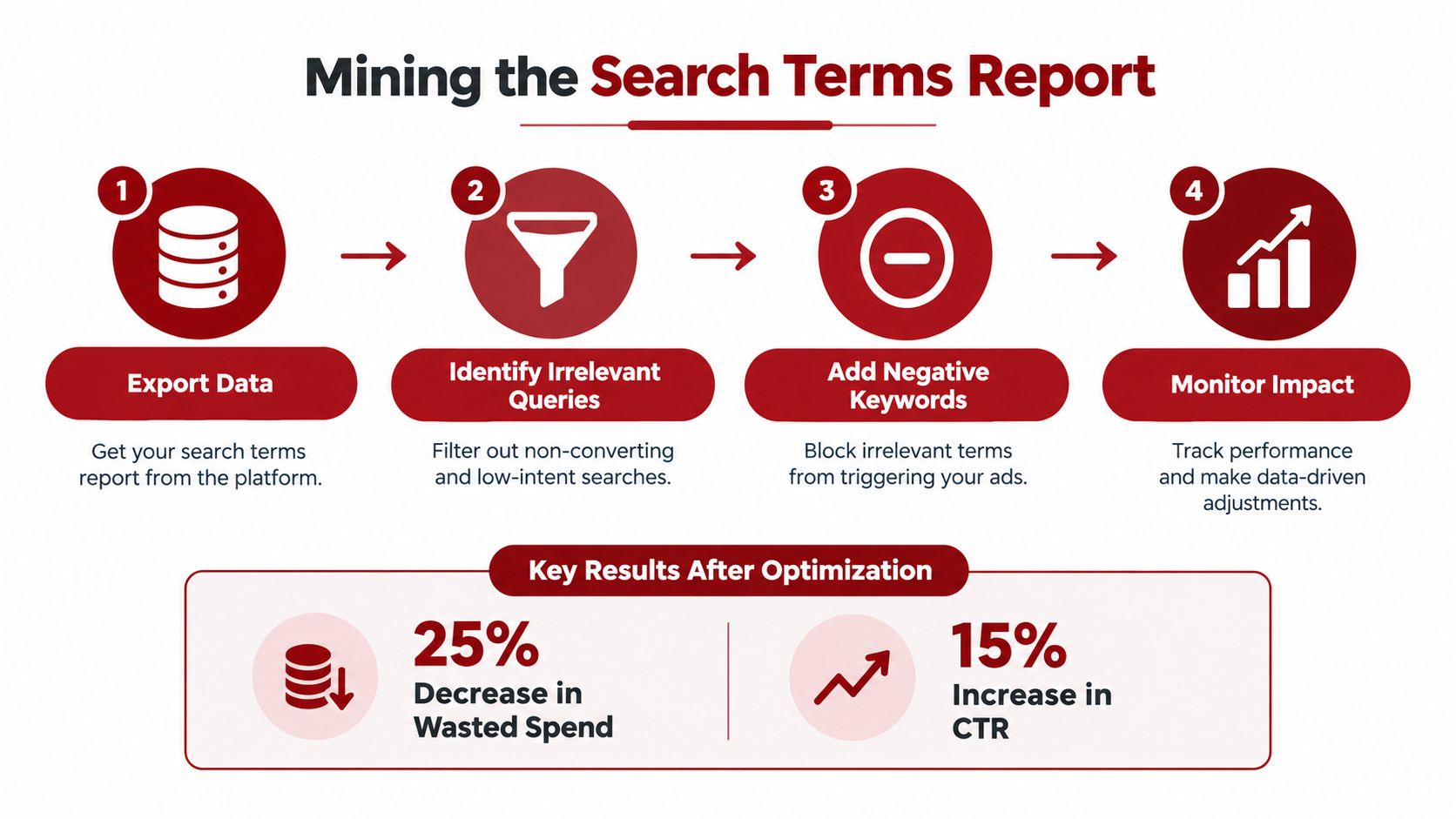
A Prescott plumbing campaign can target emergency repair buyers while still paying for searches such as “plumbing jobs Prescott” or “free plumbing course.” The Search terms report is where a negative keyword strategy becomes operational. It shows the wording people entered, the campaign and ad group that served, the cost, and the keyword that triggered the ad. That detail exposes gaps between the audience you intended to reach and the intent Google matched.
A disciplined review process
Open the Search terms report: In Google Ads, open the campaign's keyword and search-term reporting area. Review the query, campaign, ad group, cost, clicks, conversions, and triggering keyword together.
Sort by cost first: Review expensive queries before low-cost curiosities. A search that has consumed meaningful budget without matching your services deserves attention sooner than an unusual query with little activity.
Classify the intent: Separate clearly irrelevant searches from terms that are merely broad. “Plumbing jobs Prescott” signals employment intent. “Emergency plumber Prescott” signals service intent. Those queries require different decisions.
Add the smallest useful exclusion: If “training” appears across several campaigns, a shared training-related list may fit. If the conflict affects one service line, apply a narrower campaign-level negative. This keeps valid searches for other services active.
Google recommends the Search terms report as a source of negative-keyword opportunities. Account structure and business context still determine the right action. Don't block a valuable local term because it has not converted yet. Conversion lag, limited volume, phone-call tracking, and differences in service coverage can make an early decision unreliable.
Why the click threshold matters
One recommendation is to wait until a query has accumulated at least 20 clicks before excluding it, unless the intent is plainly impossible for the business (Search terms and negative keyword workflow guidance). The threshold is a safeguard against reacting to noise, not a universal rule.
Exclude terms such as “jobs,” “salary,” “free,” or a service you categorically do not provide as soon as they appear. Review ambiguous searches such as “roof estimate,” “landlord plumbing,” or a nearby community more carefully. Check location eligibility against service-area pages, call recordings, form submissions, and sales feedback before blocking a market the company can serve.
Before applying a negative, ask:
Does the query conflict with the service? A window company should review whether a “window” search concerns installation, replacement, parts, or another product.
Does it conflict with the customer type? A business serving homeowners may not want renter-focused maintenance searches.
Does it conflict with the service area? A Prescott campaign may need exclusions for locations the company will not travel to.
Is the evidence sufficient? Consider cost, clicks, conversions, and lead quality together.
For account structure and query-management practices, Silva Marketing outlines Google Ads best practices.
How Negative Match Types Work
A negative keyword is a text filter, not a semantic blocklist. Google states that negative keywords do not match close variants or other expansions, although the system accounts for capitalization and misspellings. Search campaigns support broad, phrase, and exact negative match types, each controlling the literal wording differently (Google's negative keyword match-type guidance).
A negative such as can remove queries containing that word. It will not reliably catch every synonym, reordered phrase, or AI-generated variation. For a water-heater contractor, excluding may reduce instructional searches, while related queries such as “repair water heater yourself” can still require separate review.
Negative Match Type Behavior
Match Type | Syntax | What It Blocks | What It Misses |
|---|---|---|---|
Broad | Searches containing both words, even when their order changes | Searches containing only one word, synonyms, and different wording | |
Phrase | Searches containing the words in that order, with other words before or after | Reordered words, synonyms, and differently expressed concepts | |
Exact | The specific query represented by the negative | Longer variations, reordered wording, synonyms, and related searches |
The table uses illustrative syntax. Check the selected negative match type before saving an exclusion from the Search terms report. Google also indicates that separate misspelled versions are unnecessary because negative keywords account for misspellings. That coverage does not mean one negative captures plural forms, synonyms, or every related intent (Google's official negative keyword documentation).
Choosing control without choking demand
Phrase match suits a recognizable intent pattern when legitimate searches contain some of the same words. A contractor may use a phrase negative around “jobs” or “training” to block employment and education queries while preserving service searches that include a broader term.
Exact match works when one query consistently produces poor leads but longer variations may still convert. Broad negatives block more literal combinations, yet they can remove valuable searches when the words appear in both unwanted and qualified queries. For a local service campaign, review the potential loss of calls and forms before applying a broad term across campaigns.
Negative keywords remain text exclusions, not a complete semantic firewall. Check actual query wording, group recurring patterns by intent, and test exclusions against high-value searches before extending them throughout the account. This matters when a location name, service term, or customer descriptor can describe both an out-of-area search and a profitable local lead.
Scaling Exclusions with Shared Lists and Account Controls
A Northern Arizona account may begin with one Search campaign, then split into emergency service, core services, branded traffic, locations, and Shopping or Performance Max. Re-entering the same exclusions in each campaign creates uneven protection and makes audits harder. A negative list that blocks “jobs” in one campaign but not another can leave the same wasted query active elsewhere.
Shared negative keyword lists reduce that maintenance. Create separate lists for employment intent, DIY and instructional searches, and unsupported locations, then apply each list only where the business logic fits. When a new irrelevant pattern appears, one update can protect several campaigns instead of requiring repeated edits.
Organize lists by business logic
Avoid one oversized list named “all negatives.” Clear categories show why each term exists and make later changes safer.
Employment and education: Add terms such as jobs, salary, careers, school, training, and certification when those audiences are not customers.
DIY and information: Group tutorial, instructions, free, and how-to intent when the advertiser sells professional service rather than educational content.
Out-of-area locations: Keep cities and regions outside the service territory in a dedicated list. Review it before applying it broadly, especially if the company expands.
Competitor or test terms: Separate optional exclusions from universally irrelevant terms. This lets the team test their effect without altering core protection.
Service routing: Use campaign-level negatives when campaigns should not compete, such as keeping branded searches separate from generic service traffic.
Account, campaign, and shared-list controls serve different purposes. Account-level exclusions suit terms that should be blocked broadly, but they require a stricter review because one mistaken location or service term can remove qualified demand across the account.
Know the platform limits
Google lists a maximum of 10,000 negative keywords per campaign, 5,000 keywords per negative keyword list, and 20 negative keyword lists per account. Display and Video campaigns have a cap of 1,000 considered negative keywords, so controls built for Search do not transfer perfectly to every campaign type (Google Ads account limits).
Performance Max also needs deliberate exclusion management. Google's guidance states that the Performance Max negative keyword cap reached 10,000 in 2025, giving advertisers more room to manage campaigns across multiple inventory surfaces (Google's negative keyword guidance). That capacity supports organized controls. It does not justify adding every vague term that looks undesirable.
Automation can speed up search-term reporting, list maintenance, and change detection. It should not make the final relevance decision without service-area and lead-quality context. Silva Marketing's Google Ads automation tools overview provides a reference for deciding which account tasks belong in automation and which still need human review.
Local Service Examples and Common Budget Traps
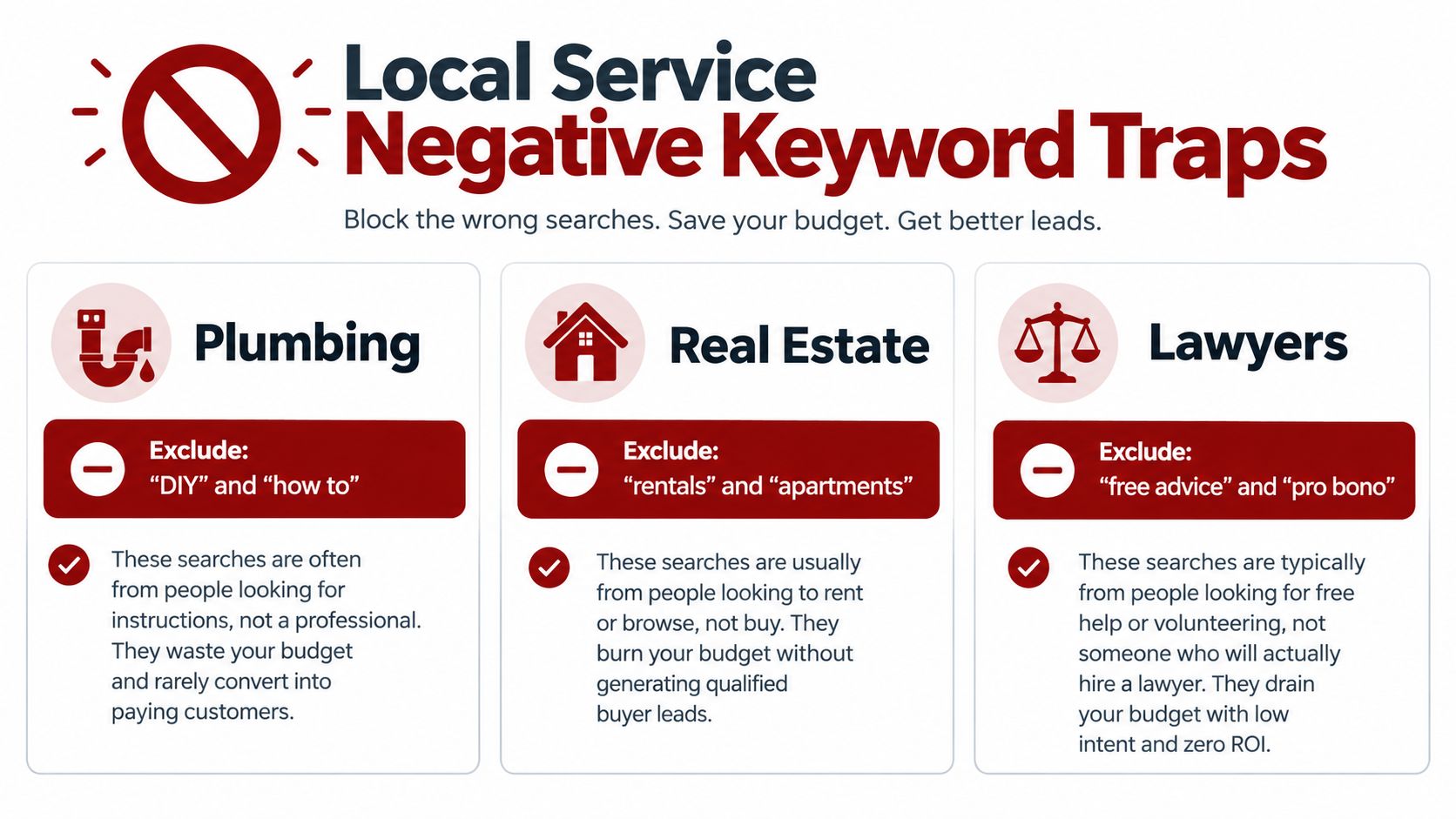
A Prescott plumbing campaign can attract a genuine emergency call, but it can also pay for someone searching “DIY drain cleaning,” “plumbing apprentice jobs,” or a part for a repair they plan to handle themselves. Those searches may contain the service keyword, yet the person isn't looking to hire the company.
Real estate campaigns face a different trap. A buyer-focused advertiser may show for “Prescott apartments,” “house rentals,” or “property management jobs” when the service is residential sales. In that situation, , , and employment terms may belong in carefully scoped exclusion lists, provided the business doesn't serve those audiences.
Common traps by service category
Plumbing and HVAC: Watch for DIY instructions, parts, manuals, training, jobs, and free advice. A query such as “how to unclog a sink” may be relevant to the topic but not to a company selling a service call. Keep emergency service terms protected from exclusions that contain common words like “repair” or “help.”
Contractors and remodelers: Filter searches for plans, blueprints, classes, wages, and home-improvement tutorials when the campaign is designed to generate installation or renovation leads. Don't exclude “estimate” or “cost” automatically. Those words often indicate commercial investigation and can lead to a qualified conversation.
Law firms: Searches for free legal advice, pro bono support, legal aid, law school, and attorney jobs may consume budget without matching a retained-client model. A firm serving paying clients should decide whether low-cost or informational audiences belong in a separate campaign rather than assuming every legal query is equally valuable.
Location isn't a complete safeguard
Google location settings can reduce exposure outside a target area, but location references still require review. A search mentioning Phoenix, Las Vegas, or another market may appear because the person is researching a move, comparing providers, or searching for a business in a different city. If Silva Marketing manages a campaign for a company that serves only a defined Prescott-area radius, the exclusion should reflect the actual travel boundary and business model, not an improvised list of every place in Arizona.
Use the query, lead details, and sales feedback together. A location term may be irrelevant for one service but valuable for another, especially when a contractor travels for larger projects or serves multiple Northern Arizona communities.
Your Monthly Maintenance Cadence and Next Steps
Negative keyword management works best as a recurring operating habit. A practical review starts with the Search terms report, sorts by cost and clicks, identifies clear mismatches, and checks whether a new exclusion belongs at the ad-group, campaign, shared-list, or account level.
A review routine that stays manageable
Review new query patterns: Look for jobs, DIY, unsupported services, irrelevant products, and out-of-area intent.
Protect ambiguous demand: Don't exclude a query solely because it hasn't converted when the wording still fits the service and location.
Audit list membership: Remove outdated exclusions when services, brands, locations, or customer types change.
Escalate repeated problems: If the same irrelevant term appears across campaigns, move it into an appropriate shared list.
Verify measurement: Check calls, forms, and qualified outcomes with a reliable Google Ads conversion tracking setup, because negative-keyword decisions are stronger when lead quality is visible.
A negative list isn't a substitute for solid campaign structure, accurate location settings, relevant landing pages, or trustworthy conversion tracking. It is the control that keeps those investments focused on people who can hire you in Prescott and Northern Arizona.
If you want a second set of eyes, Silva Marketing can audit your Google Ads search terms, negative match types, shared lists, location exclusions, and conversion tracking. Visit Silva Marketing to discuss a clear, no-pressure review of how your account protects budget and turns local search intent into qualified calls and leads.
Comments