
How to Create SEO Friendly URLs That Rank and Convert

A Prescott contractor can do excellent work, earn strong word-of-mouth referrals, and still lose clicks when a service page uses a URL like . A prospective customer sees no clear service, no location, and no reason to trust the destination before clicking.
An SEO-friendly URL is a readable, concise, stable web address that tells people and search engines what a page covers. Silva Marketing helps local service businesses in Prescott and Northern Arizona turn clicks into customers through authority-first websites, search engine optimization, and conversion-focused digital strategy. The team serves Prescott, Prescott Valley, Chino Valley, Dewey-Humboldt, and surrounding Northern Arizona communities, with experience launching 500+ websites.
Table of Contents
What Makes a URL SEO Friendly and Why It Matters in Prescott - What an SEO-friendly URL should communicate - Does URL length affect rankings?
Anatomy of a Clean URL and Core Formatting Rules - Use a consistent format
How to Craft the Perfect Slug for Service and Location Pages - Service page examples - Short versus descriptive
Common URL Mistakes and How to Fix Them With Redirects and Canonicals - Diagnose the visible symptom - Repair moved and duplicated URLs
Your Migration Checklist and Next Steps With Silva Marketing - Frequently asked questions
What Makes a URL SEO Friendly and Why It Matters in Prescott
A Prescott homeowner comparing remodeling companies may see these two addresses:
The second URL identifies both the service and its market before the page loads. That clarity helps someone scanning mobile results, opening a referral link in a neighborhood group, or comparing local contractors. For service businesses, a location-aware URL also supports a consistent connection between the page, its on-page content, and the areas the company serves.
Google's URL structure guidance favors descriptive, concise, stable URLs, readable paths, and limited unnecessary parameters. A clean address gives visitors context and makes links easier to share. Consistent paths also help crawlers understand how important pages fit within the site.
What an SEO-friendly URL should communicate
A useful URL makes the page topic clear without exposing a database string. For a local service company, name the service and add a location when the page targets that location.
Examples include:
Avoid cramming every keyword variation into one slug. looks engineered and gives users less confidence. One precise service phrase is easier to read, maintain, and connect to a real customer need.
URL structure also affects day-to-day site management. Logical paths simplify internal links, sitemap checks, analytics reports, and content audits. Silva Marketing's guidance on crawl budget optimization applies here because intentional architecture helps search engines discover the pages that matter most, including priority service and location pages.
Practical rule: Write a URL a Prescott customer could understand when it appears alone in a text message.
Does URL length affect rankings?
There is no ideal character count to pursue for SEO. Google's John Mueller has said URL length is not a ranking factor because URLs primarily identify pages, as summarized in this discussion of Google's position on URL length.
Short URLs remain useful in practice. They are easier to read, remember, share, and update. A large-scale analysis of 11.8 million search results reported an average top-10 URL length of 66 characters, as reported in Backlinko's URL length study. Use that figure as context, not a limit. A readable, relevant URL serves a local lead better than an artificially shortened address that removes meaning.
Anatomy of a Clean URL and Core Formatting Rules
Take this address:
`
The protocol is , the domain is , the folder is , the slug is , and the parameter is . Each part has a job, but not every part belongs in every public URL.
The slug is the section most businesses control directly. It should identify one page, match the page's purpose, and remain stable after publication.
Use a consistent format
Apply the same rules throughout the site:
Use lowercase: is safer and more consistent than mixing uppercase and lowercase paths.
Use hyphens: Google recommends hyphens between words because they make concepts easier for users and search engines to identify. The hyphen guidance summarized here explains why underscores aren't recommended.
Remove spaces and unusual characters: Spaces become encoded characters, while symbols can make links harder to interpret and share.
Avoid unnecessary dates and IDs: A random number rarely helps a customer understand a service page, and a date can make evergreen content appear outdated.
Keep folders shallow: Use folders when they clarify relationships, but don't bury a page under layers that add no meaning.
Choose one trailing-slash convention: Make the slash or no-slash version the preferred address and redirect the other version consistently.
A folder such as can help visitors and editors understand the website. A long sequence such as usually adds clutter unless each level reflects a meaningful navigational structure.
The site structure guidance from Silva Marketing provides useful context for deciding when folders support organization and when they lengthen paths.
A URL should be easy to read aloud, easy to type, and unlikely to need explanation later.
The following video offers a visual walkthrough of URL slug principles:
How to Craft the Perfect Slug for Service and Location Pages
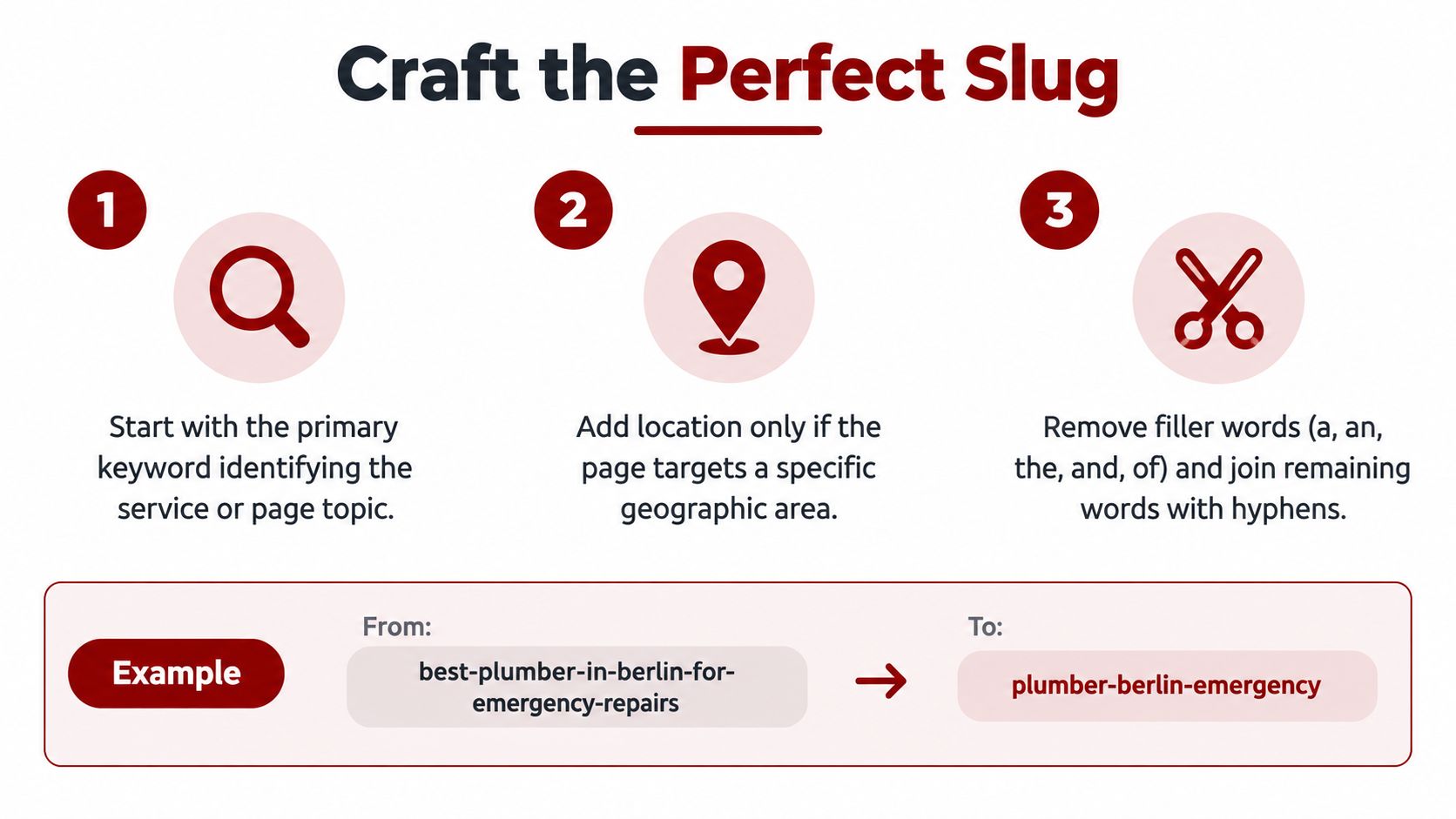
Start with the page's primary intent. Ask, “What does this page help someone find or do?” If the answer is Prescott kitchen remodeling, the slug should reflect that topic rather than the internal campaign name or the page's original draft title.
A practical workflow looks like this:
Name the core service. Use the term customers recognize, such as , , or .
Add one useful modifier. Add a location or service distinction when it changes the page's meaning, such as , , or .
Remove filler. Words such as “a,” “an,” “the,” “and,” and “of” often add length without improving identification.
Read it aloud. If the URL sounds awkward when spoken, simplify it.
Check the page match. The slug must describe the actual content, not a broader topic the page doesn't serve.
Service page examples
A local contractor's service URL might begin as:
A clearer version is:
If the website groups services in a way that helps navigation, this can also work:
Neither structure wins automatically. Choose the folder when it reflects a stable information architecture, not because adding folders creates a ranking advantage.
Location pages require more care. A company serving Prescott and Prescott Valley might use:
Each page should offer distinct local information. Copying one service page and swapping the city name creates a weak experience and can make the location structure difficult to defend. The URL should identify the intended market, while the page itself should explain local service coverage, customer needs, and the business's actual ability to serve that area.
Short versus descriptive
Google's documentation supports concise, readable paths, but there isn't a universal character ceiling. A 2026 analysis of 27,000 SERPs found that URLs of 30 characters or fewer had a mean ranking position of 5.74, while URLs in the 81 to 100 character range had a similar mean position of 5.87, and the 31 to 60 character group had 5.92, as reported in this analysis of URL length and ranking.
That comparison reinforces the practical trade-off. Don't delete useful context just to hit an arbitrary limit, and don't add words to capture every related keyword.
Setting Up SEO Friendly URLs in WordPress and Shopify
WordPress and Shopify both let you create readable paths, but they expose different controls. The safest setup is the one that establishes a stable pattern before many pages are published.
On WordPress, go to Settings, Permalinks and choose a structure that uses the post name for most small business sites. Edit an individual page's slug in the WordPress editor before publishing. If categories are part of a large content system, use them deliberately. Don't add category bases merely to make a URL look more technical.
Shopify uses handles for products, collections, and pages. You can edit a product handle in the product editor, a collection handle in the collection settings, and a page handle in the page editor. Shopify maintains platform-specific folders for content types, so businesses have less freedom to flatten every path. Work with those conventions rather than creating unnecessary workarounds.
Setting | WordPress | Shopify |
|---|---|---|
Main page URL | Edit the permalink structure and page slug | Edit the page handle |
Service organization | Use pages and optional folders or categories | Use pages, collections, or the platform's content paths |
Product paths | Usually controlled through permalink and site structure choices | Product URLs follow Shopify's product path conventions |
Redirects | Configure through a redirect plugin, SEO tool, or server-level system | Manage URL redirects in Shopify's navigation settings |
Canonical control | SEO plugins and theme or technical settings | Shopify generates canonical signals, with additional control depending on the implementation |
Date-based paths | Usually avoid them for evergreen business content | Not typically needed for service pages |
Migration review | Audit old slugs, internal links, redirects, and canonicals | Review handles, product links, collection links, and redirects |
A custom build gives the team more control over the relationship between navigation, folders, slugs, and templates. Silva Marketing describes its custom WordPress website design work in that broader context, where technical structure and conversion goals need to support each other.
Don't change a live URL casually. If you must change it, document the old address, publish the new one, and create the redirect before removing the old page.
Common URL Mistakes and How to Fix Them With Redirects and Canonicals
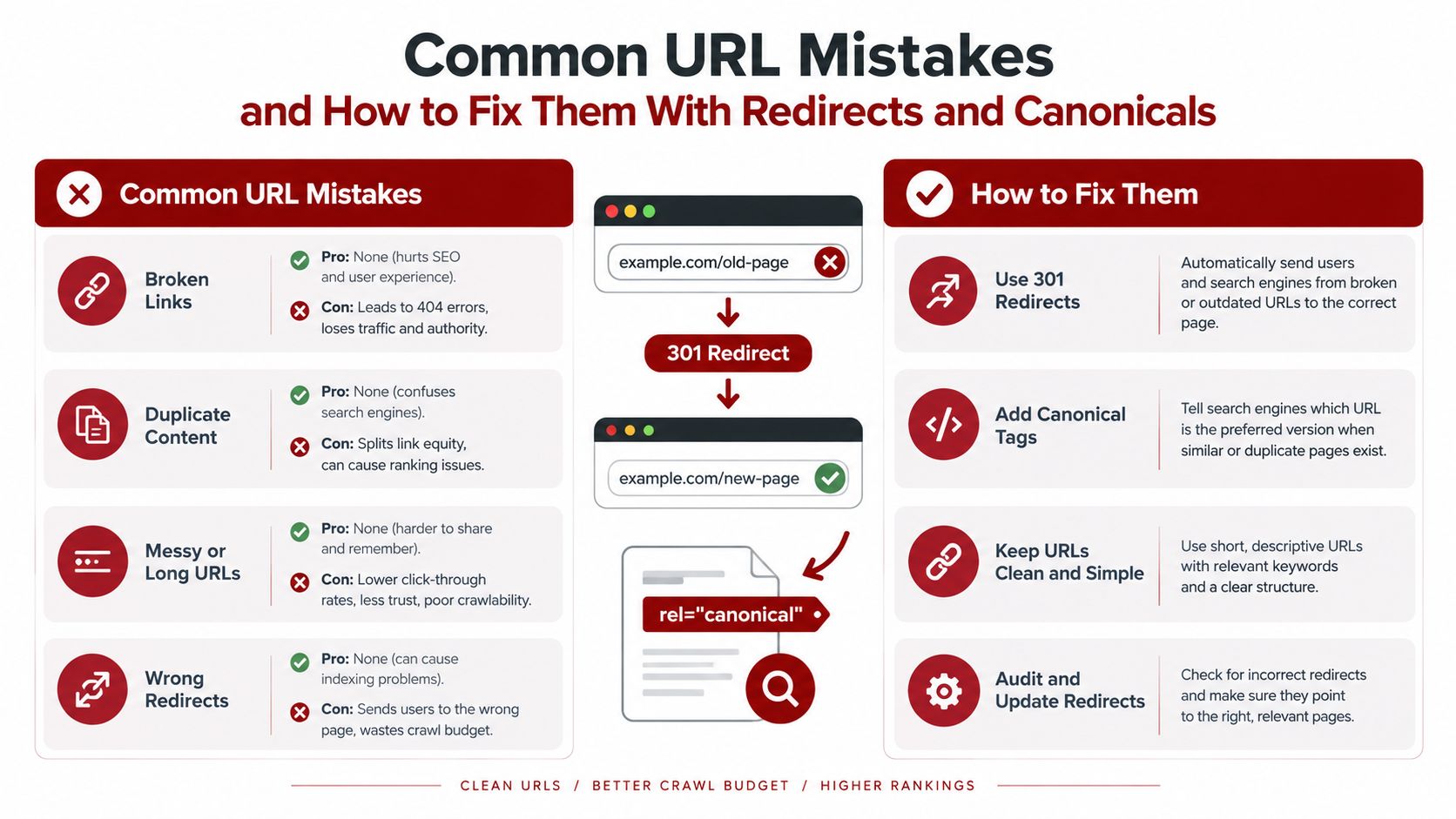
Most URL problems aren't caused by one bad slug. They come from inconsistent decisions across a growing website. One page uses uppercase, another uses underscores, a third includes tracking parameters, and the migration team later discovers several versions of the same destination.
Diagnose the visible symptom
Keyword stuffing produces a URL that looks written for an algorithm rather than a customer. Trim it to the core topic and one meaningful modifier.
Underscores make word separation less clear. Replace them with hyphens when creating a new path, but don't leave the old address inaccessible if it has links or traffic.
Uppercase and lowercase variants can create separate addresses on systems that treat case as meaningful. Select an all-lowercase canonical version and redirect alternate forms when the platform allows it.
Parameter bloat often appears in filtered pages, tracking links, or poorly designed templates. Keep useful tracking where it belongs, but don't allow endless parameter combinations to become competing indexable pages.
Repair moved and duplicated URLs
A 301 redirect sends visitors and crawlers from a permanently moved address to its replacement. Map each old URL directly to the closest relevant new page. Avoid chains such as old URL to intermediate URL to final URL because every extra step adds failure risk and complicates diagnosis.
Canonical tags solve a different problem. They identify the preferred version when similar or duplicate URLs can exist, but they don't replace a redirect when the old page should no longer be accessed. Decide whether the page should remain available, consolidate, or redirect, then apply the appropriate control.
Common duplicate variants include:
and non-
HTTP and HTTPS
trailing slash and no trailing slash
uppercase and lowercase paths
old service URLs and newly organized folder paths
A technical review should inspect response codes, redirect destinations, canonical tags, internal links, XML sitemaps, and indexation. Silva Marketing's technical SEO audit checklist is a useful reference for that broader inspection.
Your Migration Checklist and Next Steps With Silva Marketing
URL cleanup is manageable when the team treats it as a controlled migration rather than a cosmetic rewrite. Start with an inventory of live pages, indexed pages, important referral URLs, and existing redirects.

Use this working checklist:
Inventory current URLs: Export the site's important pages and note their purpose, location, and current status.
Map every change: Pair each old URL with the most relevant new destination before publishing.
Implement direct 301 redirects: Test the old address and confirm it reaches the intended page without a chain.
Update internal links: Point navigation, service pages, location pages, and calls to action directly to the preferred URLs.
Set canonical signals: Confirm each indexable page identifies the correct canonical address.
Review the sitemap: Include preferred, live URLs and remove obsolete versions.
Test in Google Search Console: Inspect representative pages, check indexing signals, and watch for crawl or coverage issues.
Monitor after launch: Review errors, redirects, rankings, calls, and form submissions rather than relying on URL changes alone.
Frequently asked questions
Should you change a URL that already ranks?
Leave a stable URL alone when it is clear, relevant, and technically sound. Change it when the current path is misleading, obsolete, duplicated, or tied to a structure you're correcting across the site. Always map the old address to the new one first.
Should every location have its own URL?
Only when the business serves that location and can provide useful, specific information there. A Prescott page and a Prescott Valley page should explain real service coverage and local relevance, not repeat the same text.
How long should redirects remain active?
Keep redirects in place as part of ongoing site governance, especially when other sites, customers, or printed materials may still use the old address. Removing one can turn a useful historical path into a broken link.
What should a local business check first?
Start with the service pages that generate calls and the location pages that support local discovery. Those URLs deserve clear naming, direct internal links, correct canonicals, and careful redirect testing.
Silva Marketing is based in Prescott and works with service businesses across Northern Arizona on custom websites, redesigns, technical SEO, local search strategy, and Google Ads. Its authority-first process connects URL decisions with site structure, page clarity, and measurable lead generation, while its community-aware approach keeps service areas and business information consistent.
Silva Marketing can review your existing URL structure, plan a safe migration, and build an SEO-focused website that makes services and Prescott-area coverage clear to customers and search engines. Visit Silva Marketing to request a calm, no-pressure consultation about your next step.
Comments