
How to Measure SEO ROI for Local Service Businesses

A Prescott HVAC contractor can spend money on SEO, see more website visits, and still have no clear answer to the only question that matters: did those visits produce profitable work? The same problem affects roofers, plumbers, electricians, remodelers, and other local service businesses across Prescott, Prescott Valley, Chino Valley, Dewey-Humboldt, and Northern Arizona.
Silva Marketing helps local businesses connect search visibility to calls, form fills, booked jobs, and signed contracts, rather than stopping at rankings or sessions. This guide explains how to measure SEO ROI with a practical system that combines GA4, Search Console, call tracking, CRM data, attribution, and real lead values.
By the end, you'll have a framework for setting goals, assigning conversion values, tracking organic interactions, handling assisted conversions, calculating ROI, and avoiding the reporting mistakes that make a campaign look stronger or weaker than it really is.
Table of Contents
Why Measuring SEO ROI Matters for Local Service Businesses - SEO ROI forces honest goals - It separates SEO from other channels - It makes owner conversations survivable
Define Goals, Conversions, and Real Dollar Values - Separate macro and micro conversions - Assign values from closed business - Value-setting checklist
Set Up Tracking in GA4, Search Console, and Your CRM - Connect search behavior to lead behavior - Add phone and CRM attribution - Finish with a short QA pass
Attribute Organic Traffic the Right Way - Read the journey, not just the final source
Calculate SEO ROI with a Simple Formula and an LTV-Adjusted Version - Revenue is not always the same as economic value
Common Pitfalls That Inflate or Deflate Real Numbers - Five checks that protect the calculation
Why Measuring SEO ROI Matters for Local Service Businesses
A monthly SEO retainer can look reasonable on paper. The trouble starts when an owner sees a traffic increase but can't tell whether that traffic became profitable work. If the report highlights impressions, rankings, and sessions while the phone rings no more often, the business still lacks a financial answer.
SEO ROI is commonly calculated as:
(net profit from organic search − SEO cost) ÷ SEO cost × 100
This formula turns organic search performance into a comparable return. For a local service company, however, the hard part isn't the arithmetic. It's identifying which calls and leads came from SEO, determining which opportunities became customers, and using profit or defensible lead value instead of optimistic assumptions. First Page Sage explains the standard SEO ROI formula and why organic returns often require a longer evaluation horizon.
SEO ROI forces honest goals
A campaign should have a business outcome attached to it. That might be booked HVAC repairs, signed roofing estimates, or closed remodeling contracts. Rankings can support those outcomes, but they aren't the outcome themselves.
A useful measurement plan separates:
Primary revenue goals: Booked jobs, signed estimates, or closed contracts.
Secondary conversions: Qualified calls, quote requests, and completed contact forms.
Supporting signals: Organic landing-page engagement, service-area visibility, and non-branded search discovery.
This separation keeps a local business from treating every visitor as equally valuable.
It separates SEO from other channels
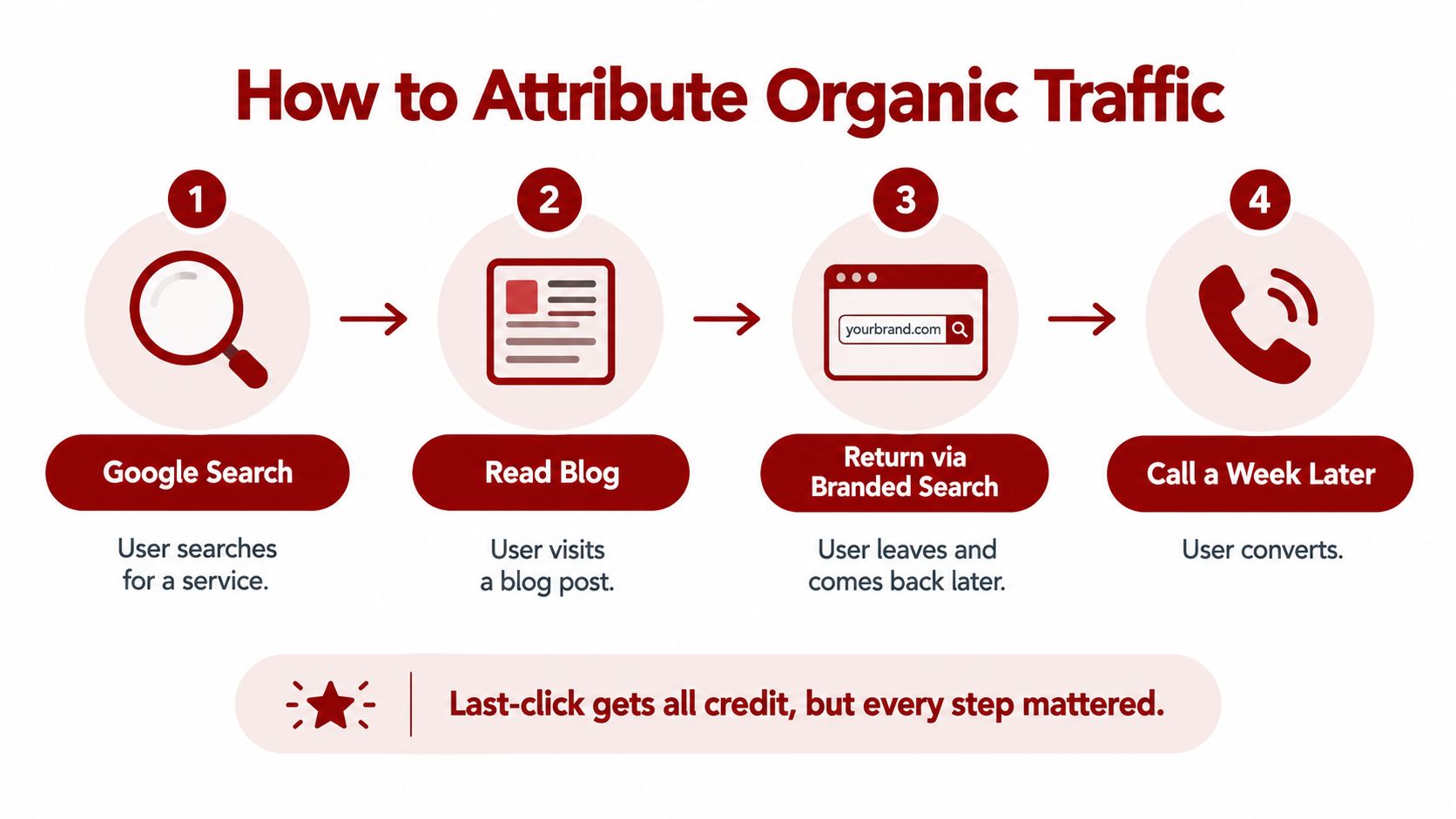
A customer may first discover a roofer through an organic service page, return through a branded search, and call after reviewing the Google Business Profile. If the final interaction gets all the credit, SEO appears less useful than it was. Multi-touch reporting matters because organic search frequently assists conversions rather than closing them immediately.
The broader benchmark context supports that distinction. Industry summaries report that 49% of marketers identify organic search as the leading ROI source, while 60% say inbound methods such as SEO produce the highest-quality leads. SEOprofy summarizes those benchmark findings and the importance of connecting organic activity to revenue.
Practical rule: If you can't connect a report line to a call, form, opportunity, booked job, or sale, treat it as a diagnostic metric, not ROI.
It makes owner conversations survivable
Monthly retainer conversations become much easier when everyone agrees on the measurement rules before the campaign begins. Owners can see what SEO cost, which leads it influenced, what sales accepted, and where the tracking still has gaps.
Silva Marketing applies this approach for Prescott and Northern Arizona businesses that need a clearer connection between search work and lead flow. The framework below gives you a practical way to establish that connection in an afternoon, provided your website, analytics, phone system, and CRM are accessible.
Define Goals, Conversions, and Real Dollar Values
Before opening GA4, decide what a successful organic lead is worth. Most misleading dashboards start with vague goals and unverified values, not with a broken analytics script.
Choose one primary revenue goal first. A service business might select booked jobs, signed estimates, or closed contracts. Then choose two secondary goals, such as qualified phone calls and completed quote forms. This hierarchy prevents a high volume of low-value actions from overpowering the business result.
Separate macro and micro conversions
Macro conversions create direct revenue. Micro conversions show buying intent but usually need additional sales activity before they become revenue.
Examples include:
Macro conversions: Booked jobs, signed estimates, completed sales, and closed contracts.
Lead conversions: Qualified phone calls, quote requests, contact form submissions, and booking requests.
Micro conversions: Clicks to call, newsletter signups, service-area page engagement, and Google Business Profile direction requests.
Not every tracked action deserves the same value. A booked emergency repair should carry more weight than a directions request, while a qualified estimate request may be worth more than a general contact form.
Assign values from closed business
Use CRM records and closed deals rather than a preferred price point. Pull the average job value from your recent closed business, calculate the lead-to-close rate, and use:
Average job value × close rate = value per lead
For example, if a Prescott plumbing company's average completed job is valued at $1,200 and the company closes 25% of qualified leads, the calculated value per lead is $300. This is a worked example, not a benchmark. Your own CRM should replace both inputs.
Micro-conversion values can use a fraction of lead value or a time-weighted estimate. Keep the method consistent, document it, and revise it when ticket size or close rate changes.
Conversion Type | Example Value | How It Was Calculated |
|---|---|---|
Booked job | $1,200 | Average closed job value |
Qualified phone call | $300 | Average job value × close rate |
Quote request | $300 | Assigned the qualified lead value |
General contact form | Lower than qualified lead value | Adjusted for weaker intent |
Directions request | Small supporting value | Assigned as an intent signal, not revenue |
A business should also decide whether its primary report uses revenue or profit. Revenue is easier to collect, but profit gives a more honest view when labor, materials, subcontractors, and fulfillment costs vary.
Value-setting checklist
Before tracking begins, document:
The primary revenue event.
The two most important secondary conversions.
The average value from closed CRM deals.
The qualified lead-to-close rate.
The value assigned to calls, forms, and booking actions.
Whether reports use gross revenue, contribution margin, or net profit.
That short document becomes the reference point for every monthly SEO report.
Set Up Tracking in GA4, Search Console, and Your CRM
A reliable local SEO measurement stack has four connected layers: GA4 for behavior, Search Console for search visibility, call tracking for phone leads, and a CRM for revenue outcomes. Build them in that order so each system passes useful information to the next.
First, verify that GA4 is installed across the entire website. If the installation needs attention, use a practical guide to install Google Analytics tracking code and confirm that the tag fires on service pages, location pages, blog posts, and contact pages.
Create a clean event plan with names such as:
phone_click: A visitor taps a phone link.
form_submit: A visitor submits a standard contact form.
quote_request: A visitor requests an estimate.
booking_confirmed: A visitor completes a booking.
Mark the important events as key events and apply the values established earlier. Don't create several events for the same action just because different forms use different designs.
Connect search behavior to lead behavior
Link Google Search Console to GA4 so queries and landing pages can be reviewed alongside engagement and conversion activity. Search Console helps answer which searches bring visibility, while GA4 shows what visitors do after arriving.
For a deeper first-party measurement setup, Silva Marketing's guide to website visitor tracking provides additional context on connecting visitor behavior to marketing decisions.
Add phone and CRM attribution
Use dynamic number insertion on organic landing pages through a call-tracking platform such as CallRail or WhatConverts. A separate forwarded tracking number on the Google Business Profile can also help identify calls originating from that listing, provided the setup doesn't create confusion for customers or staff.
Then send form fills and bookings into a CRM such as ServiceTitan, HubSpot, or Jobber. Preserve source and medium fields, landing page, service requested, lead status, close status, and final deal value. Without those fields, the analytics platform may record a conversion while the business loses the outcome that makes it financially meaningful.
The Google Analytics attribution model determines how conversion credit is assigned, and GA4 offers Data-driven attribution along with alternatives such as Paid and organic last click in its attribution reports. Google's GA4 documentation explains the available attribution settings. Lookback windows also affect the result. GA4 uses a default 30-day acquisition lookback window and a default 90-day window for other key events, with adjustable options described in Google's lookback-window documentation.

Finish with a short QA pass
Trigger every event manually, confirm the assigned values, test call recordings and source labels, and verify that CRM records preserve organic source data. Screenshot the funnel for the monthly report, then reconcile analytics conversions against actual calls and submitted forms before discussing performance.
Attribute Organic Traffic the Right Way
A local buyer rarely follows a one-click path. Someone may search for “roof repair Prescott,” read a service article, leave the website, return through a branded search, and call later after deciding the problem is urgent. Last-click reporting may credit the branded search or direct visit while giving little or no credit to the organic discovery that started the journey.
The difference can be material. One field experiment summarized in industry reporting found that multi-touch attribution valued organic search up to 77.25% more than last-touch models, while non-branded organic search was valued up to 81.59% more. The Stacc's reporting explains how last-touch attribution can undercount organic influence.
Read the journey, not just the final source
In GA4, review both Traffic Acquisition and User Acquisition reports. The first helps you understand session-level source behavior, while the second provides a user-oriented view of how people first arrived. Use the Model Comparison tool to compare attribution models and inspect conversions that had organic interactions before the final conversion.
A U-shaped model can fit a business that wants to emphasize the first discovery and final conversion touchpoints. A time-decay model may fit a longer sales cycle where later interactions deserve more influence. Data-driven attribution can provide another view when the property has sufficient usable interaction data, but it still needs to be reconciled against CRM outcomes.
Flag organic sessions that assisted but didn't close immediately. Then compare those assists with CRM opportunity source, sales notes, call recordings, and eventual close status. This helps distinguish genuine influence from accidental visits, duplicate records, unqualified inquiries, and tracking noise.
For businesses managing multiple locations or visitor experiences, Virtual Tour Easy tracking setup offers useful context on recording lead-source information across interactions.
The connection between analytics and CRM also highlights why first-party data matters. Your own lead and customer records can show whether organic visitors become qualified opportunities and paying customers, even when search platforms provide incomplete click visibility.
Before accepting a single-channel ROI number, ask:
What was the first known interaction?
Did organic search assist the conversion?
Are branded and non-branded searches separated?
Does the CRM agree with the analytics conversion count?
How long does this business usually take to close a lead?
Calculate SEO ROI with a Simple Formula and an LTV-Adjusted Version
The core calculation is straightforward:
SEO ROI = (SEO revenue − SEO cost) ÷ SEO cost × 100
Use organic-attributed revenue from your chosen attribution view. Include the full SEO investment, not just an agency invoice. That may include content, technical implementation, link acquisition, reporting software, internal labor, and the time your team spends reviewing or publishing work.
A Prescott HVAC company, for example, could attribute 24 booked jobs to organic search at an average job value of $1,850, producing $44,400 in attributed revenue. If the company spent $12,000 on SEO during the measurement period, the calculation is:
($44,400 − $12,000) ÷ $12,000 × 100 = 270%
This is a first-touch revenue example. A profit-based calculation could be lower if fulfillment costs are substantial, while a multi-touch model could assign SEO a different share of the same customer journey.
Revenue is not always the same as economic value
Local service businesses often have repeat work, maintenance plans, referrals, or additional jobs from the same customer. An LTV-adjusted view can include that future value, but only if the business has a defensible customer lifetime value model.
For example, if a home services business records a $3,200 customer lifetime value and its CRM shows a repeat-customer pattern, it can use that LTV in a separate scenario rather than replacing the initial booked-job figure without explanation. Keep the first-sale view and LTV view side by side. This makes the assumption visible instead of presenting projected future revenue as cash already collected.
Input | Example HVAC Co. | Example Home Services Co. |
|---|---|---|
Organic-attributed booked jobs | 24 | Use CRM total |
Average initial job value | $1,850 | Use closed-deal average |
Customer lifetime value | Use initial job value unless documented | $3,200 |
SEO cost | $12,000 | Enter actual cost |
Attribution view | First touch | Compare selected models |
Reported return | 270% revenue ROI | Calculate from verified inputs |
Use a separate payback-period report to show when cumulative gross profit covers cumulative SEO cost. ROI describes the return over a defined period. Payback describes how long it takes to recover the investment. SEO often needs a longer window than paid media because content, indexation, rankings, and conversions develop over time. Industry summaries commonly report positive returns within 6–12 months, which is why a single early month shouldn't determine the final judgment. First Page Sage's benchmark discussion explains the delayed break-even pattern.
For a practical cost comparison, businesses can also review Silva Marketing's guide to cost per acquisition calculation.
Common Pitfalls That Inflate or Deflate Real Numbers
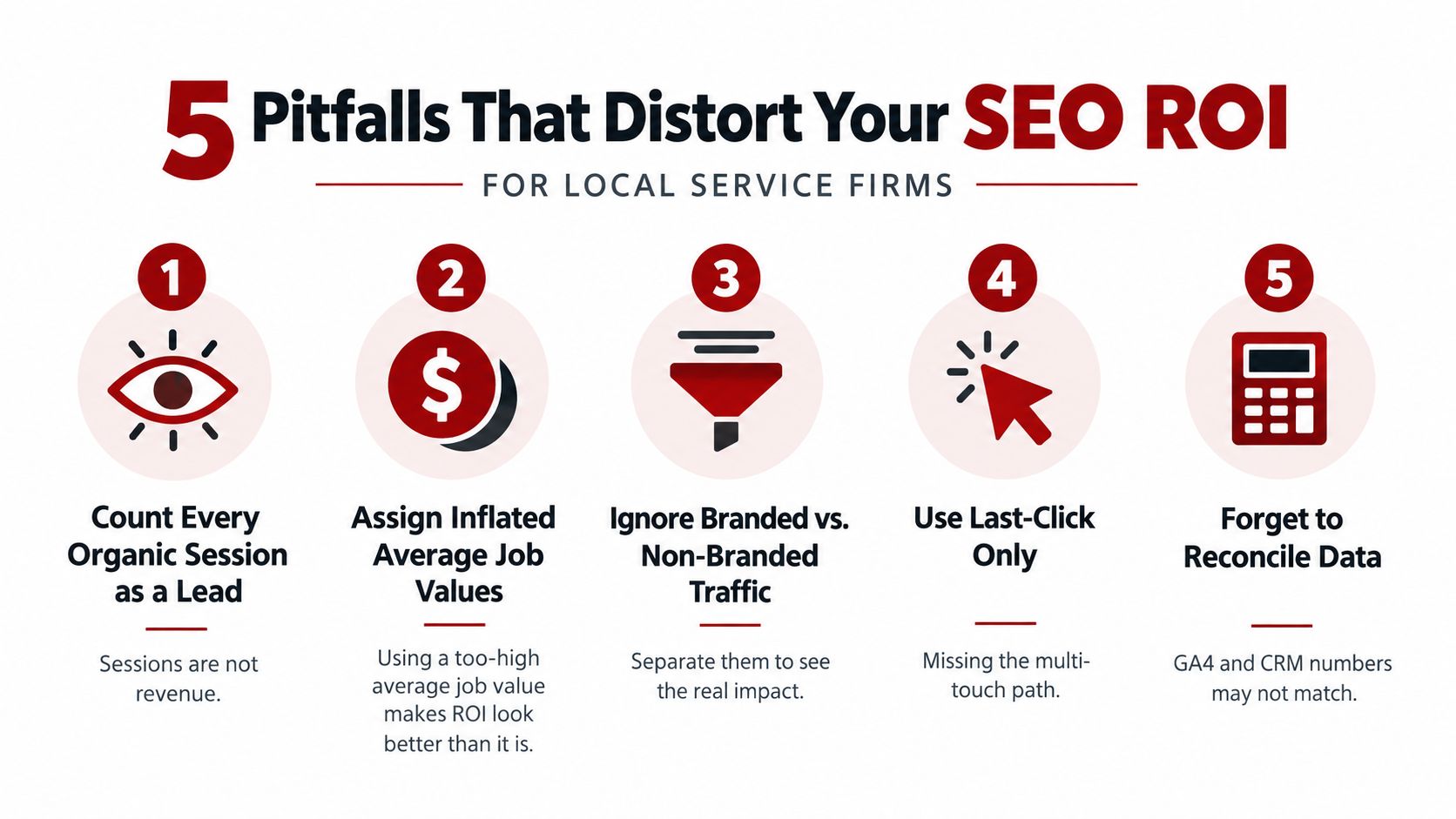
A Prescott service company can show strong SEO revenue on paper while the CRM contains few qualified calls or booked jobs. Small tracking assumptions create inflated ROI, understated ROI, or totals nobody can reconcile with the bank account.
Five checks that protect the calculation
Treat every session as a lead: Sessions measure visits, not revenue. Fix: Pull lead values from CRM records and connect them to qualified calls, forms, and booked work.
Use an inflated average job value: Selecting only high-ticket jobs and ignoring ordinary or slow-month work makes ROI look stronger. Fix: Use closed-deal revenue from a defined period, then compare it with the actual service mix.
Mix branded and non-branded traffic: Branded searches can reflect existing demand. Non-branded searches often introduce new prospects. Combining them hides that difference. Fix: Report both segments separately.
Use last click only: Last-click reporting can miss earlier organic interactions in a multi-touch journey, so it may undercount organic's contribution by up to 80%. Fix: Compare last click with data-driven, U-shaped, or time-decay views, and inspect assisted conversions.
Forget to reconcile the systems: GA4, call tracking, and the CRM may show different totals. Fix: Compare records monthly, investigate duplicates, and document which system controls closed revenue.
Revenue alone can also mislead. Labor, materials, subcontractors, refunds, and warranty work may leave a campaign with weak cash economics despite attractive reported revenue. Use a margin-aware calculation when those costs vary materially, and confirm the profit retained before treating a high percentage as success.
Match the reporting window to the sales cycle. If leads need follow-up before closing, measure the full journey and label open opportunities as open. Forcing them into won or lost categories too early distorts both conversion rates and booked-job value.
Optimization Tips, Free Template, and Next Steps
Once the measurement foundation works, optimization becomes a recurring operating habit rather than a monthly reporting exercise. Review assumptions against real sales data, then adjust the campaign based on qualified outcomes.
Use this checklist:
Review goals quarterly: Compare assumed close rates with actual CRM close rates.
Reconcile GA4 with the CRM monthly: Match organic conversions with closed-deal values and lead status.
Reweight lead sources: Shift attention toward service pages, queries, and channels that produce qualified opportunities.
Update underperforming content: Use Search Console to identify query-level decay, declining landing pages, and missed service intent.
Protect conversion paths: Review forms, phone links, booking steps, and mobile usability through a conversion-rate lens. Silva Marketing's guide to conversion rate optimization provides a useful companion framework.
A free spreadsheet template should mirror the calculations in this guide. Include input cells for organic sessions, leads, close rate, average job value, attributed revenue, gross margin, and SEO cost. Add separate fields for first-touch, last-touch, assisted, and CRM-closed values so the report makes uncertainty visible instead of hiding it.
For Prescott and Northern Arizona businesses, the useful question isn't whether traffic rose in isolation. It's whether organic search produced better calls, form fills, booked jobs, and profitable contracts, and whether the tracking can prove that connection.
Silva Marketing helps Prescott and Northern Arizona service businesses measure SEO through calls, form fills, booked jobs, and closed revenue, with custom websites, SEO, and Google Ads built around accountable lead generation. Visit Silva Marketing to request a calm, measurement-focused review of your current numbers, without turning the conversation into a sales pitch.
Comments