
Sitemap XML Best Practices for Local SEO

Most local business owners are told to create an XML sitemap, submit it to Google, and wait for indexing to improve. That advice is incomplete. A sitemap is not an indexing shortcut or a ranking guarantee. It's a controlled discovery file, and its value depends on whether it contains accurate, canonical, indexable URLs that search engines can process efficiently.
Silva Marketing helps service businesses in Prescott, Northern Arizona, and nearby communities build websites and SEO systems that turn search visibility into qualified calls and leads. For a local contractor, professional service firm, or multi-location company, the practical problem is rarely “How do I list every URL?” It's “Which pages deserve to be discovered, and can search engines trust the signals I'm sending?”
Table of Contents
Rethinking Sitemaps for Local Search Visibility - What a sitemap can and cannot do
Technical Specifications and Hard Limits - When one sitemap file is enough - How a sitemap index scales the system
What to Include and Exclude from Your Sitemap - The inclusion filter for local businesses - What creates crawl noise
Handling Media and Multi-Language Signals - Use image and video extensions carefully - Multilingual and regional alternatives
Generation Automation and Lastmod Hygiene - When omission is safer - A workable automation policy
Submission Monitoring and Troubleshooting Errors - Submit the sitemap directly - Diagnose the actual failure
Implementation Checklist and Common Questions - The local sitemap audit - Common questions from business owners
Rethinking Sitemaps for Local Search Visibility
An XML sitemap tells search engines which URLs you consider important. Google describes it as a way to help search engines crawl a site more efficiently and identify pages you believe matter, but it also makes clear that a sitemap doesn't guarantee every listed URL will be crawled or indexed. The distinction matters for a Prescott service business competing for searches across Prescott Valley, Chino Valley, Dewey-Humboldt, and Northern Arizona.
A sitemap can help a crawler discover a valuable service page that isn't strongly connected through internal links. It can also expose a problem. If the file contains redirected URLs, duplicate location pages, expired promotions, or thin filtered URLs, it tells search engines that your publishing and technical systems aren't aligned.
Practical rule: Treat your sitemap as a curated inventory of your most important search-ready pages, not as a database export.
What a sitemap can and cannot do
A clean sitemap supports discovery. It doesn't replace:
Internal linking: Important pages still need relevant links from navigation, service pages, location pages, and useful content.
Technical accessibility: Search engines must be able to fetch the sitemap and the URLs inside it.
Canonicalization: The listed URL should be the preferred version of the page.
Content quality: A sitemap can point to a page, but it can't make a weak page useful.
Local relevance: A service-area page needs accurate information about the communities and services it covers.
The common and fields don't provide the benefit many older guides suggest. Google ignores both fields, so spending time assigning arbitrary values to them is usually wasted effort. The stronger signals are canonical URL selection, valid responses, and truthful data when that data can be maintained consistently, as explained in Google's sitemap overview.
For a local business, a smaller file is often more useful than a bloated one. Include the pages that explain your services, locations, expertise, and customer value. Don't add every tag archive, query variation, or automatically generated page because your CMS can produce it.
A useful site-structure review can expose the pages that deserve inclusion and the pages that should be removed from the crawl path. Silva Marketing's guidance on site structure for SEO is relevant here because the sitemap should reflect a coherent architecture, not compensate for a confusing one.
Technical Specifications and Hard Limits
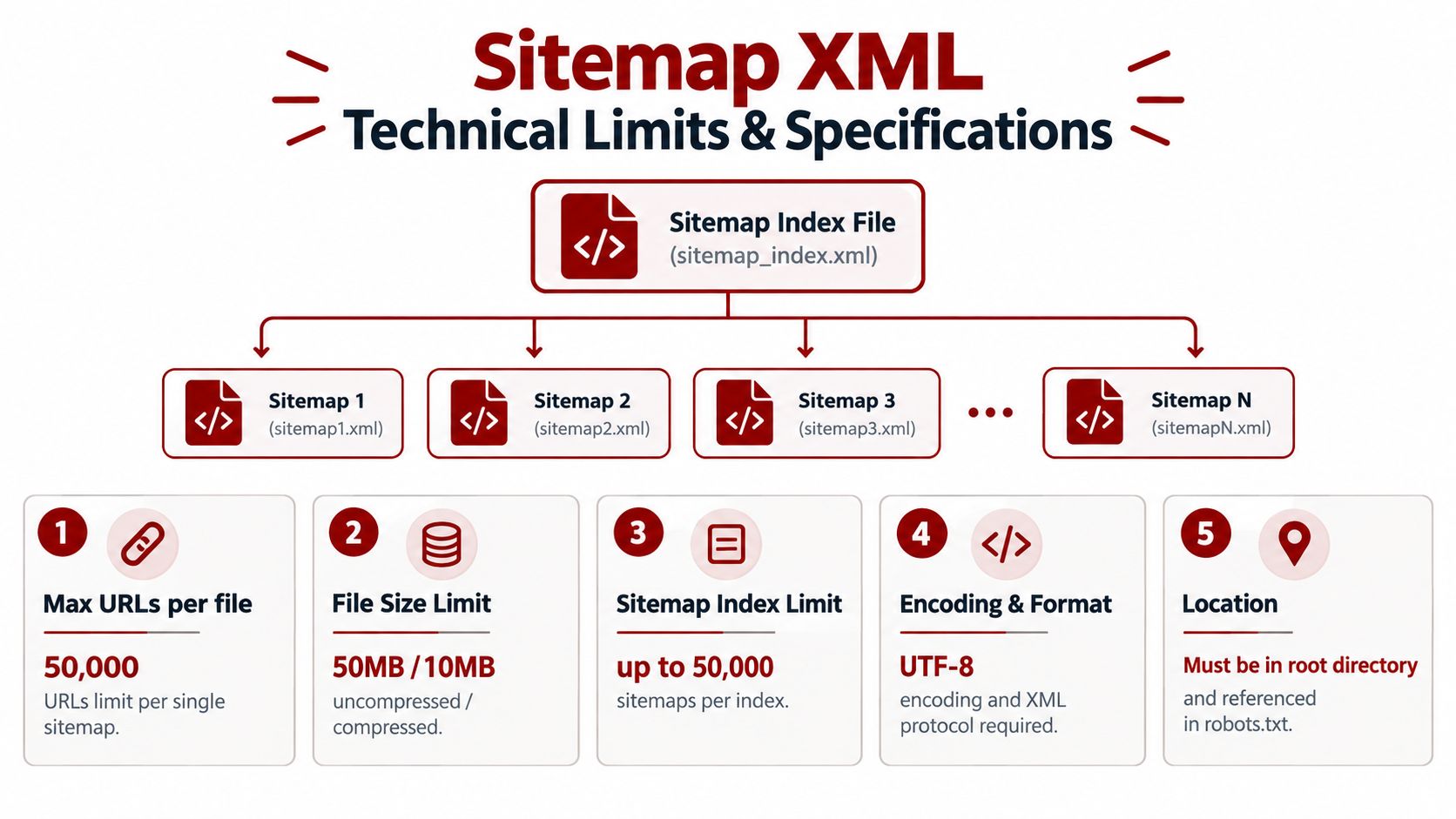
The Sitemaps protocol has been standardized since 2004, and its core limits remain straightforward. A single XML sitemap file can contain no more than 50,000 URLs and must remain under 50MB uncompressed, according to Google's sitemap creation guidance.
Those limits apply to each individual sitemap file. Gzip compression can reduce the file size during transfer, but the uncompressed file size still governs compliance, as documented in the Sitemaps protocol FAQ. A compressed file that looks small in transit can still exceed the protocol limit after decompression.
When one sitemap file is enough
A typical local service business often has a manageable set of pages:
Core service pages
Legitimate city or service-area pages
About, contact, and location information
Useful articles and guides
Relevant media attached to important pages
The exact file size isn't the objective. The objective is a valid XML document containing URLs that are worth discovering. A smaller site should still follow the same rules, even when it's far below the technical ceiling.
Each sitemap needs the required XML structure, including a single root and a entry for every URL. URLs should be fully qualified, canonical, and encoded correctly. The protocol requires UTF-8 encoding, and special characters must be escaped so the XML remains valid.
How a sitemap index scales the system
When a site exceeds either limit, split the URLs into multiple sitemap files and publish a sitemap index. The index uses a root, with each child entry containing a that points to an individual sitemap file.
Google documents that a sitemap index can list up to 50,000 sitemap locations, and its values must use W3C Datetime format, as described in Google's large sitemap documentation. Multiple sitemap index files are permitted by the protocol, which gives large multi-location organizations room to scale without changing the basic architecture.
A practical structure might separate pages by type, such as service pages, location pages, blog content, products, or media. Segmentation makes troubleshooting easier because you can identify which group contains errors instead of inspecting one enormous file.
For local companies growing into multiple markets, sitemap architecture belongs alongside broader crawl-budget planning. Silva Marketing's crawl budget optimization guidance covers the larger system, while the sitemap provides a clean list of preferred crawl targets.
What to Include and Exclude from Your Sitemap
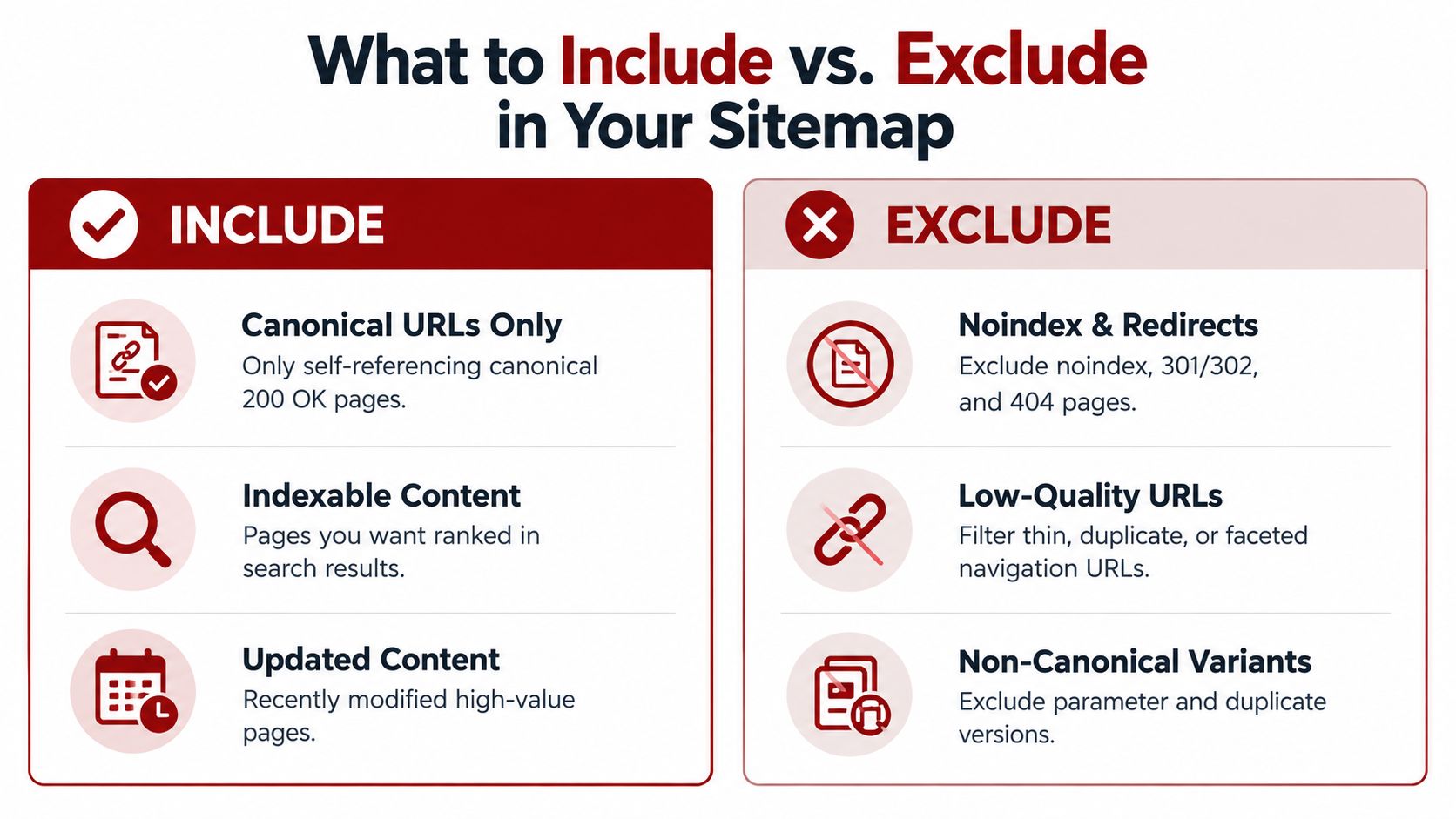
The inclusion test is simple: Would you want this exact URL to appear in search results, and does it return a successful, indexable response? If the answer is no, it doesn't belong in the sitemap.
Google's sitemap documentation supports using canonical, indexable URLs and accurate modification information. That means the file should contain the preferred version of each page, not every address your website happens to generate.
The inclusion filter for local businesses
Use this filter before a URL enters the file:
Canonical: The URL is the preferred version and aligns with the page's canonical tag.
Indexable: The page isn't blocked by a noindex directive and is intended for organic search.
Live: The URL returns HTTP 200 rather than redirecting or failing.
Useful: The page provides meaningful value to a prospective customer.
Connected: The page has a logical place within the site's internal linking structure.
That usually means including your main service pages, strong location pages, important educational content, and core business information. A Prescott plumbing company might include pages for clearly offered plumbing services and legitimate communities it serves. It shouldn't create near-identical pages for every neighborhood unless each page has a genuine local purpose and distinct, useful information.
What creates crawl noise
Exclude redirects, noindex pages, broken URLs, and duplicate versions. Parameter URLs deserve particular attention because filters, tracking parameters, and faceted navigation can multiply addresses without creating new search value.
Common exclusions include:
Redirect destinations and sources: List the final canonical page, not a redirecting address.
Noindex content: A noindex page contradicts the sitemap's implied recommendation.
404 pages: Broken URLs don't help crawlers or customers.
Duplicate variants: Choose one preferred URL rather than listing multiple versions.
Thin faceted pages: Filter combinations that add little unique value should stay out.
Internal search results: Search-result pages often create low-value URL combinations.
Temporary campaign pages: Remove them when they're no longer useful or indexable.
A bloated sitemap doesn't make a business look larger. It makes quality control harder. For local businesses, curation is the advantage because the file can clearly represent the pages that support calls, visits, and informed buying decisions.
Handling Media and Multi-Language Signals
An ordinary page sitemap can identify important page URLs, but media extensions can help search engines interpret images and videos associated with those pages. This matters for local businesses that rely on visual proof, such as builders, remodelers, photographers, salons, and product-based companies serving Northern Arizona.

Use image and video extensions carefully
An image entry belongs inside the relevant element. The image namespace must be declared on the root element, and the image data should describe an image that is associated with that page. The extension can include fields such as and .
A video entry follows the same nesting principle. It belongs inside the page's element and can include information such as , a title, and a description. The thumbnail location is especially important because it gives search engines a representative visual asset for the video.
Keep the page relationship clear. Don't attach unrelated portfolio images to a service page just to increase the number of media references. The sitemap should reinforce the content already visible and useful on the page.
Image discovery also depends on page performance. Lazy loading can help browsers defer off-screen assets, but implementation must still allow search engines to understand the image and its surrounding content. Silva Marketing's guide to lazy-loading images addresses that relationship between media delivery and crawlable page content.
Multilingual and regional alternatives
For businesses serving different language communities or operating across regions, hreflang declarations identify alternate versions of a page. In an XML sitemap, these relationships use the element inside the relevant entry. The root element must declare both the standard sitemap namespace and the XHTML namespace.
A simplified pattern looks like this:
Every alternate should point to a real, indexable page, and the relationship should be reciprocal. If a local company only serves English-speaking customers in Prescott and surrounding areas, it doesn't need hreflang because the site has visitors from elsewhere. Use it when different language or regional page versions exist.
Generation Automation and Lastmod Hygiene
Automation prevents a sitemap from becoming obsolete, but automated generation can also create false freshness signals. The most important operational question isn't whether your CMS adds a field. It's whether the date changes only when the page experiences a meaningful content update.
Google can use when the value is consistently and verifiably accurate. That makes the field useful when a service page receives a substantial revision, a location page gains important information, or an article is materially updated. It makes the field unreliable when a database process changes the timestamp after a comment approval, plugin update, internal metadata edit, or routine system event.
When omission is safer
A misleading date can be worse than no date. Recent commentary on lastmod hygiene includes a published example in which Google's Gary Illyes said Google might be better off without lastmods when a site emits unintentionally wrong values, as reported by Digital Applied's discussion of lastmod hygiene.
That position is practical, not dramatic. If your publishing system can't distinguish a meaningful content revision from a trivial record update, configure it to omit until the workflow becomes trustworthy. A blank field is less confusing than a timestamp that claims a page changed when its customer-facing content did not.
A workable automation policy
Set the rule before choosing the tool:
Meaningful edits only: Update the date after substantial copy, link, structured-data, or service-detail changes.
Stable formatting: Use a valid date format consistently across the file.
Removal discipline: Delete URLs when pages are permanently retired rather than leaving stale entries behind.
Change review: Compare sitemap output with the pages that changed.
Daily operations for dynamic sites: Google's operational guidance recommends updating a sitemap at least once a day for a site that changes regularly and pinging Google after each update, while maximizing URLs per file within the limits. This recommendation is summarized in XML sitemap best-practice guidance.
For a typical local service website, daily updates may be unnecessary if content changes occasionally. The principle is to match the workflow to the publishing reality. An automated file that claims constant change without meaningful edits creates noise rather than clarity.
Submission Monitoring and Troubleshooting Errors
Publishing a sitemap doesn't finish the work. Search engines need to fetch the file, parse its XML, reach the listed URLs, and interpret the signals consistently. Submission tools give you visibility into that process, but they don't turn invalid URLs into valid ones.
Submit the sitemap directly
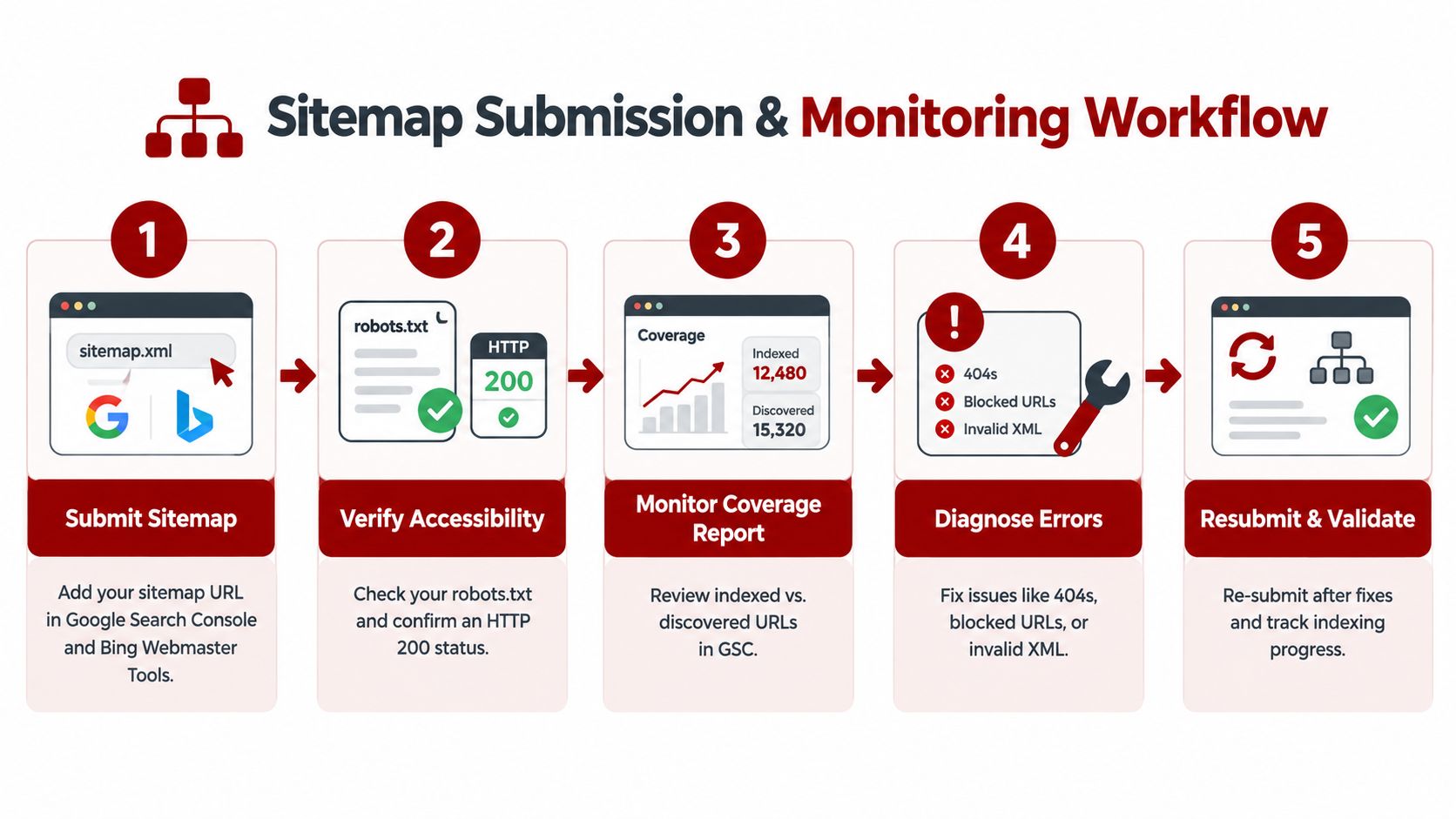
In Google Search Console, verify the correct website property, open Sitemaps, enter the sitemap or sitemap index path, and submit it. If the site uses an index, submit the index rather than entering every child sitemap separately. Google will then report whether it fetched and processed the file.
For Bing, use Bing Webmaster Tools to submit the sitemap and review its processing status. Direct submission gives the search engine a clear discovery path. Recent discussion also points toward using separate submission workflows for Google and Bing, rather than relying on outdated assumptions about one shared ping process. IndexNow may be relevant for eligible sites and workflows, but it complements sitemap management rather than replacing a clean sitemap.
Diagnose the actual failure
Start with the sitemap URL itself. It should be publicly accessible, return HTTP 200, and display valid XML rather than a login page, application error, or HTML error template. Check that the sitemap is referenced in , and make sure the robots rules don't block crawlers from accessing it.
Use the report to separate processing problems from URL-quality problems:
Problem | What it usually indicates | Appropriate response |
|---|---|---|
Couldn't fetch | The sitemap is inaccessible or unavailable | Check the URL, server response, permissions, and robots.txt |
Parsing error | The XML structure is malformed | Validate namespaces, closing tags, escaping, and encoding |
Invalid URL | An entry contains an incorrect or unsupported address | Correct or remove the URL |
Redirected URL | The sitemap lists a non-final address | Replace it with the canonical destination |
404 or server error | The page is unavailable | Remove it or restore the intended page |
Indexed mismatch | Listed pages aren't being indexed | Review canonicalization, noindex directives, content value, and internal links |
A warning may identify a quality or consistency issue without preventing the entire file from processing. A fatal parsing or access failure can stop search engines from reading the file properly. After corrections, validate the XML, resubmit the sitemap, and watch whether the same issue returns.
For a broader technical review, Silva Marketing's technical SEO audit checklist helps connect sitemap errors with canonicals, redirects, internal links, and crawl accessibility.
Implementation Checklist and Common Questions
A local business can maintain sitemap quality with a repeatable review rather than a complicated process. The checklist below is designed for service companies in Prescott, Prescott Valley, Chino Valley, Dewey-Humboldt, and other Northern Arizona markets.
The local sitemap audit
Run these checks in order:
Find the live file: Test the expected sitemap URL and the location listed in .
Confirm accessibility: Verify that the sitemap loads publicly and returns HTTP 200.
Validate the XML: Check the XML declaration, UTF-8 encoding, namespace, root element, and closing tags.
Review canonical alignment: Compare listed URLs with each page's preferred canonical URL.
Remove crawl noise: Exclude redirects, noindex pages, errors, duplicates, parameters, and thin faceted pages.
Check local coverage: Confirm that genuine service and location pages are represented, while avoiding doorway-style duplicates.
Inspect dates: Keep only when the publishing workflow records meaningful changes accurately.
Review limits: Confirm that every file remains within the protocol's URL and uncompressed size limits.
Check media relationships: Ensure image and video entries belong to the pages that reference them.
Submit and monitor: Use Google Search Console and Bing Webmaster Tools, then investigate processing or URL warnings.
Common questions from business owners
Do I still need an HTML sitemap?
An HTML sitemap and an XML sitemap serve different audiences. XML is for search-engine discovery, while HTML is a user-facing page that can help visitors find important sections. A clear navigation system and contextual internal links remain more important than creating an HTML sitemap solely for search engines.
Should temporary promotional pages enter the XML sitemap?
Only while the page is public, useful, indexable, and intended to remain available. If the promotion is short-lived or the page will soon redirect, noindex, or disappear, adding it can create unnecessary maintenance and stale entries.
Will a sitemap slow down my website?
The sitemap is a separate XML resource, so it doesn't normally slow the page-rendering experience for visitors. Gzip can reduce transfer size, but the protocol's uncompressed limit still applies. The larger performance concern is usually the website's pages, scripts, images, and server response, not the existence of a properly generated sitemap.
Does submitting a sitemap improve rankings?
Submission can help search engines discover important URLs and identify crawl problems. It doesn't guarantee crawling, indexing, or rankings. Strong local visibility still depends on useful pages, accurate business information, accessible site architecture, and consistent execution across the website and local presence.
Who should manage sitemap maintenance?
The responsibility should sit with whoever controls the CMS, technical SEO, and release process. For a small Prescott business, that might be an agency or web partner. Silva Marketing offers custom websites, website redesign, SEO, and Google Ads, with technical work that can include generating and submitting a current sitemap after a website launch or structural change.
The clearest standard is simple: include fewer URLs if those URLs are more trustworthy. A clean sitemap won't fix weak content or poor local strategy, but it gives search engines a reliable map of the pages you want evaluated.
Silva Marketing can review your sitemap, canonical signals, technical accessibility, and local service-page structure as part of a practical SEO assessment. Visit Silva Marketing to discuss a clear next step for improving your Prescott or Northern Arizona search presence.
Comments