
Landing Page and SEO: Build Pages That Rank and Convert

A landing page that ranks below another result can still produce more qualified calls. Search position affects visibility, but it does not show whether visitors who need the service contact the business.
Silva Marketing is a Prescott-based digital marketing agency focused on turning clicks into customers through measurable marketing and local search strategies. For a service page, the useful measure is qualified calls for that service and area, considered alongside search visibility and page performance.
Judge ranking and conversion together. A high position with few relevant inquiries may point to a mismatch between the search and the offer; a lower position that generates qualified calls may be serving its business goal. A single speed score or ranking position cannot show the full result.
Table of Contents
Landing Page Elements That Serve Both Search and Conversions
How to Write a Title, H1 and Meta Description That Match the Search - Can two service pages share a title?
Core Web Vitals Targets and How to Hit Them on Mobile - Run the measurement loop in order - Fixes that move mobile numbers
Structured Data and Canonical Tags for Service Pages - Does structured data improve rankings?
Local Signals and Service-Area Pages Across Prescott and Northern Arizona - Do I need a separate page for every town?
Landing Page Elements That Serve Both Search and Conversions
A landing page for a local service business carries two jobs at once. It has to earn visibility for one service-plus-area query, and it has to convert that visit into contact. Most pages do one and neglect the other, which is why a site can rank well and still produce a thin trickle of leads.
Silva Marketing builds these pages for contractors and service companies across Prescott and Northern Arizona, and we've launched more than 500 websites along the way. The pattern that repeats is straightforward. The elements that win search and the elements that win the call overlap far more than most templates assume.
Element | SEO job | Conversion job | Good practice |
|---|---|---|---|
Title tag | Signals the page topic to search engines and shapes the result | Sets expectations before the click | Service first, city second, unique on every page |
H1 heading | Confirms the main topic to crawlers | Matches the ad or query the visitor used | One H1 naming the service and area in plain words |
Meta description | Shapes the snippet shown in results | Earns the click from search | Short summary of the offer and who it serves |
Intro copy | Provides relevant, crawlable text | Answers the visitor's question on the first screen | Service, area and next step within two or three sentences |
URL and internal links | Makes the page findable and connected to the site | Keeps the visitor on the service path | Descriptive, stable slug linked from service and area pages |
Phone and form | No direct ranking role | Captures the lead | Click-to-call on mobile and a short form |
Trust proof | Supports prominence and legitimacy | Reduces hesitation before contact | Reviews, credentials and named local projects |
Structured data | Clarifies entity and page meaning | No direct conversion role | Markup matches the visible content |
The structured data row deserves a flag. It does nothing measurable for conversion, so don't judge it by lead counts. Judge it by whether the markup matches what a visitor can read.
Measurement is where the two jobs meet. A conversion is one defined action, and conversion rate is the share of visitors who complete it, counted per page and per area. A 2009 Columbia University study of landing pages in advertising campaigns formalized that as conversions divided by clicks associated with a landing-page URL, and made a point that still gets ignored: conversion goals vary by advertiser, so a benchmark means nothing until you define which action you're counting. The same work cautioned against assuming page type alone causes higher conversion rates, which is the correlation trap underneath most "landing page best practices" lists.
Practical rule: Pick the one action that pays the bills for that service, count it per page, and report it beside lead quality. A page with 40 form fills and 3 qualified jobs is worse than a page with 8 calls and 6.
If you're repairing an existing page instead of building new, the landing page fixes from Bluelight lay out a sensible order of work.
Three questions decide whether a page does both jobs: how you write the title and opening copy, how fast it loads on a phone, and how you test conversion elements without disturbing what search depends on.
How to Write a Title, H1 and Meta Description That Match the Search
One rule governs everything below. One landing page targets one service and one service area. Emergency plumbing in Prescott is a page. "Plumbing services across Northern Arizona" isn't one.
Google describes the title link as the headline displayed in a result, the part that helps people decide which result to click, and its guidance asks for titles that are unique, clear, concise and accurate to the page content. The snippet underneath is commonly drawn from the page's actual text, which means the visible writing has to carry the promise the title makes (Google Search Central).
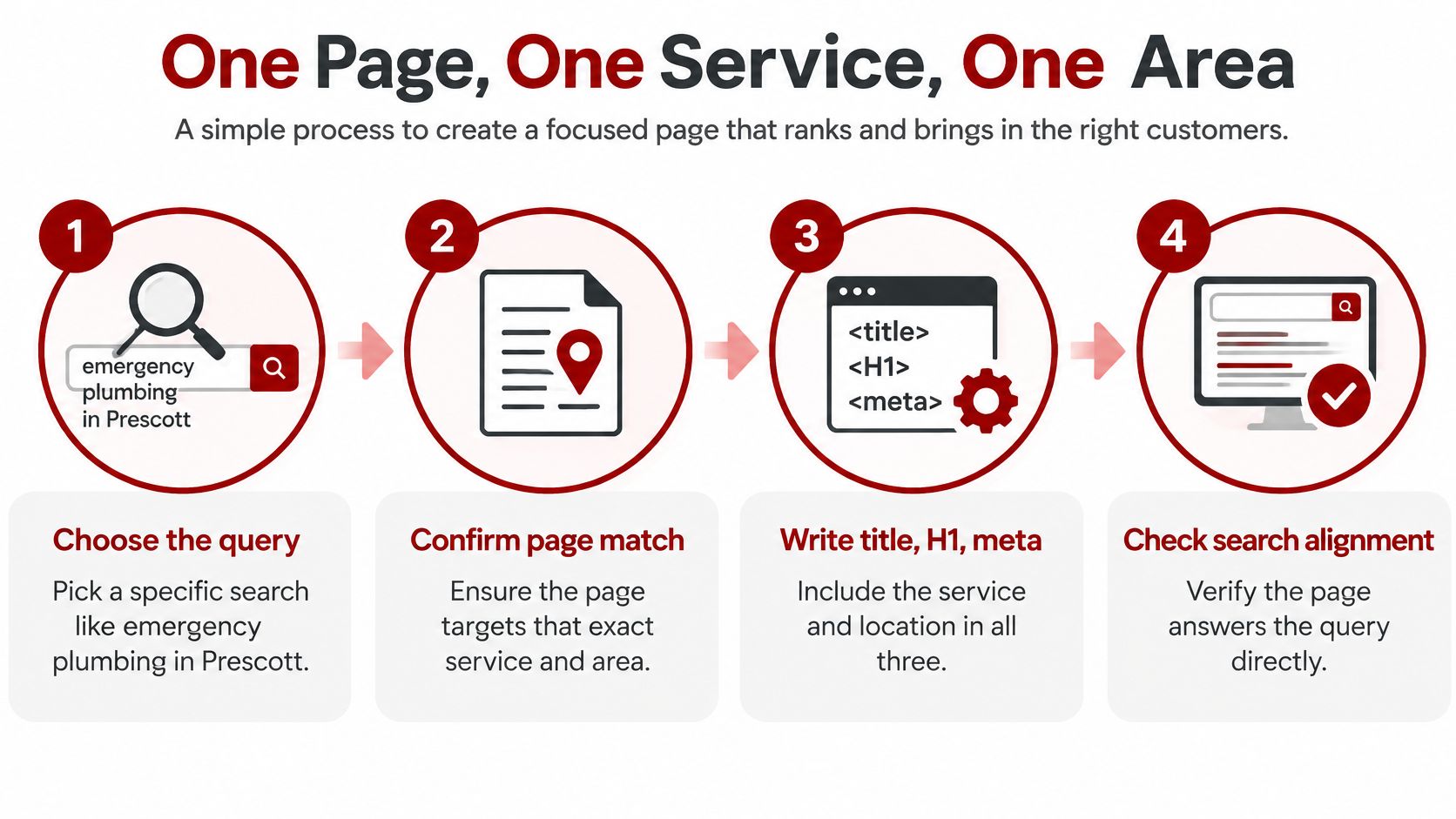
Choose the query before you write a word. Write down the phrase a ready-to-buy customer would type, then confirm the page's service matches it. A page covering three services is a landing page for none of them.
Write the title tag inside 60 characters, service first and city second. "Prescott HVAC Repair | Same-Day Service" tells both the crawler and the searcher what's on the page. Keep it unique so two services never compete on identical titles.
Write one H1 that matches the wording of the ad or query. If the ad says emergency plumbing and the H1 says "Welcome", the visitor pauses to check whether they landed in the right place. That pause costs calls.
Write a meta description of roughly 150 to 160 characters. State the offer and who it serves. Search engines rewrite descriptions often, so treat it as a nudge rather than a guarantee and keep the on-page copy consistent with it.
Open with two or three sentences that answer the question directly. What the business does, where, and the next step. That opening is also the text most likely to be pulled into a snippet or an AI summary.
Keep the URL slug descriptive, lowercase and stable. /prescott-hvac-repair beats /page-2, and once a page earns links and calls you don't want to move it.
A title like "Welcome to Our Website" gives search engines no relevance signal, and an H1 that drifts from the ad makes people doubt the click. The fix isn't more keywords. It's saying the same thing in the same words in all three places, which is what our title tag optimization guide walks through in detail.
Position and wording compound. A 2025 SEO click-through analysis collected by GrowthVector examined approximately 4 million Google results and reported an average click-through rate of 27.6% for the first organic position, with the top three results collectively receiving 54.4% of clicks, while second-page listings drew less than 1%. The same content in position two and position eight produces very different lead volume.
Can two service pages share a title?
No. Two pages with the same title compete for the same query and blur which one applies to a given town. Give each page a title naming its own service and area, and split them only when the second page has real content behind it.
Different trades follow the same structure, and Med Spa Scalers SEO services shows the pattern applied to treatment and location pages in a clinic setting, which is a useful comparison if you want to see it outside the trades.
Core Web Vitals Targets and How to Hit Them on Mobile
Three thresholds decide whether a service page passes Google's page experience check. Largest Contentful Paint of 2.5 seconds or less, Interaction to Next Paint under 200 milliseconds, and Cumulative Layout Shift of 0.1 or less, per Google's Core Web Vitals thresholds. Those numbers describe real users on real devices, not a desktop test run in a lab.
Metric | Good threshold | Common cause | First fix |
|---|---|---|---|
Largest Contentful Paint (LCP) | 2.5 seconds or less | Oversized hero image or slow server response | Compress and size the hero image, preload only the above-the-fold image |
Interaction to Next Paint (INP) | Under 200 milliseconds | Heavy JavaScript and third-party tags | Defer third-party tags and reduce mobile JavaScript work |
Cumulative Layout Shift (CLS) | 0.1 or less | Images, embeds and banners without reserved space | Set width and height on images and reserve space for embeds |
Field data check | 75th percentile over 28 days | Relying on a single lab score | Review the Core Web Vitals report in Search Console by URL group and device |
Run the measurement loop in order
Start with field data in Search Console. A Lighthouse score is a diagnostic, not a verdict. The Core Web Vitals report shows what your visitors experienced.
Segment by URL group and device. Mobile service pages are usually the weakest set for a contractor site, so start there instead of averaging the whole domain.
Fix the weakest metric first. A page group is constrained by its poorest metric, so a fast page with an unstable layout still fails the overall assessment.
Recheck after enough traffic. Search Console evaluates real users over a 28-day period and reports the 75th percentile, which means one good day doesn't move the number.
Fixes that move mobile numbers
Compress and correctly size the hero image. A photo exported straight from a phone camera and dropped in at full width is the most common LCP problem on service pages.
Preload only the true above-the-fold image or font. Preloading everything competes with the one request that matters.
Remove render-blocking scripts. Every stylesheet and script in the head delays first paint, and mobile connections feel it first.
Reserve space for images and embeds. Width and height attributes or an aspect-ratio box stop the layout jumping under a thumb.
Defer third-party tags. Chat widgets, heat maps and advertising pixels can load after the page is usable.
The full order of work, from hero image compression to tag deferral, is set out in our Core Web Vitals optimization guide.
Faster pages don't automatically produce more calls. A page that hits every threshold but buries the phone number or hides the service name still loses the visitor, so speed counts only when it protects a clear service promise and a visible conversion action. If your pages are built in a JavaScript framework, the rendering and delivery choices in this guide on how to deploy a fast React landing page are worth reading before the next rebuild, because they decide much of the LCP number before any content work begins.
The same page quality shows up in paid search. Google Ads evaluates landing-page experience as part of Quality Score, and it rates mobile speed on a 1-to-10 scale where 1 is very slow and 10 is extremely fast (Google Ads help).
One last check before you call the page done. Run the URL Inspection tool on the service page in Search Console, confirm it's indexed, then open the Performance report filtered to that single page. That way ranking movement is read beside calls and form completions rather than in isolation.
Structured Data and Canonical Tags for Service Pages
Structured data should describe information visitors can see on the page. Markup that claims a service the page does not explain can create confusion rather than clarify it.
LocalBusiness or Organization markup can identify the business name, address, phone number and service area. Keep these details consistent with the visible page content.
Service markup can describe the service offered on the page. The page itself should make clear which service and area it covers.
FAQPage markup belongs only on pages where the marked-up questions and answers are visible.
BreadcrumbList markup describes the page's position in the site structure.
Google's site appearance guidance recommends descriptive titles and meta descriptions, and says pages should be reachable through crawlable links from other findable pages. Semantic HTML and structured data can clarify a page's meaning, but neither replaces accurate, useful content.
Google says there are no additional technical requirements for appearing in AI Overviews or AI Mode. Its guidance points to the same fundamentals: crawlable pages, indexable text, helpful content, internal links, page experience and structured data that matches what visitors can see. Google Search Central also reports that the share of queries showing AI Overviews in the U.S. and India has grown by more than 10% (AI features and your website).
Canonical tags help search engines select the URL to represent a page when duplicate or near-duplicate versions exist. Set them deliberately.
Use a self-referencing canonical on each landing page. This identifies the preferred URL when tracking parameters create alternate versions.
Point duplicate versions to the preferred page. Parameterized URLs, print versions and filtered views should point to the URL you want indexed.
Keep distinct service-area pages self-canonical. A city page that offers useful local information should not point its canonical to the home page.
A canonical error may show up as a service page that stops earning qualified calls, even when other pages continue to rank.
Does structured data improve rankings?
Structured data can clarify page meaning and make a page eligible for enhanced search results, but it does not guarantee those results. Prioritize accurate visible content, useful internal links and a canonical URL that reflects the page's purpose.
Before publishing, validate the markup and check that every declared detail matches the page. For a worked example of local business markup, compare the structured data with the information visitors can read.
Local Signals and Service-Area Pages Across Prescott and Northern Arizona
Google says local visibility is decided primarily by three factors: relevance, distance and prominence (Google Business Profile help). Relevance measures how closely a profile matches the search, distance measures how far the business is from the searcher, and prominence reflects how well known the business is.
A landing page controls two of those three directly and influences the third slowly. Relevance is entirely in your hands: the page should name the service, the business location and the communities served in plain language. Distance is fixed by geography, so the honest move is to state which towns you cover, Prescott, Chino Valley, Prescott Valley, and only where you send crews. Prominence grows from reviews, review ratings, accurate directory listings, links and credible local mentions, all of which Google says can influence it.
Consistency is the quiet part. The business name, address and phone number should match character for character across the Business Profile, the site footer and every directory you claim. A suite number formatted three ways reads as three businesses.
Two mistakes show up again and again. The first is a set of pages that are one page with the city swapped and nothing else changed, which gives a reader no reason to call and gives Google no reason to rank it above the original. The second is a long list of town names with no local detail behind any of them.
Practical rule: Create a separate service-area page for a town only when you have real local detail to add, such as completed projects, crew coverage, realistic drive times or permit experience in that jurisdiction.
Silva Marketing works with Prescott and Northern Arizona businesses on exactly this layer, pairing keyword research with honest area coverage so each page has something to say. The keyword side of that work is covered in our local SEO keyword research guide.
Do I need a separate page for every town?
No. One strong page with honest coverage usually beats a dozen thin ones, because substance is what earns both the ranking and the call. Add a page when you have local evidence to fill it, not because a list of towns looks impressive.
Testing Conversion Elements Without Hurting Your Rankings
Reduce friction before you add visual complexity, and change conversion elements without touching the title, H1 or core copy that search relies on. That single constraint prevents most of the ranking dips that follow a "conversion optimization" project.
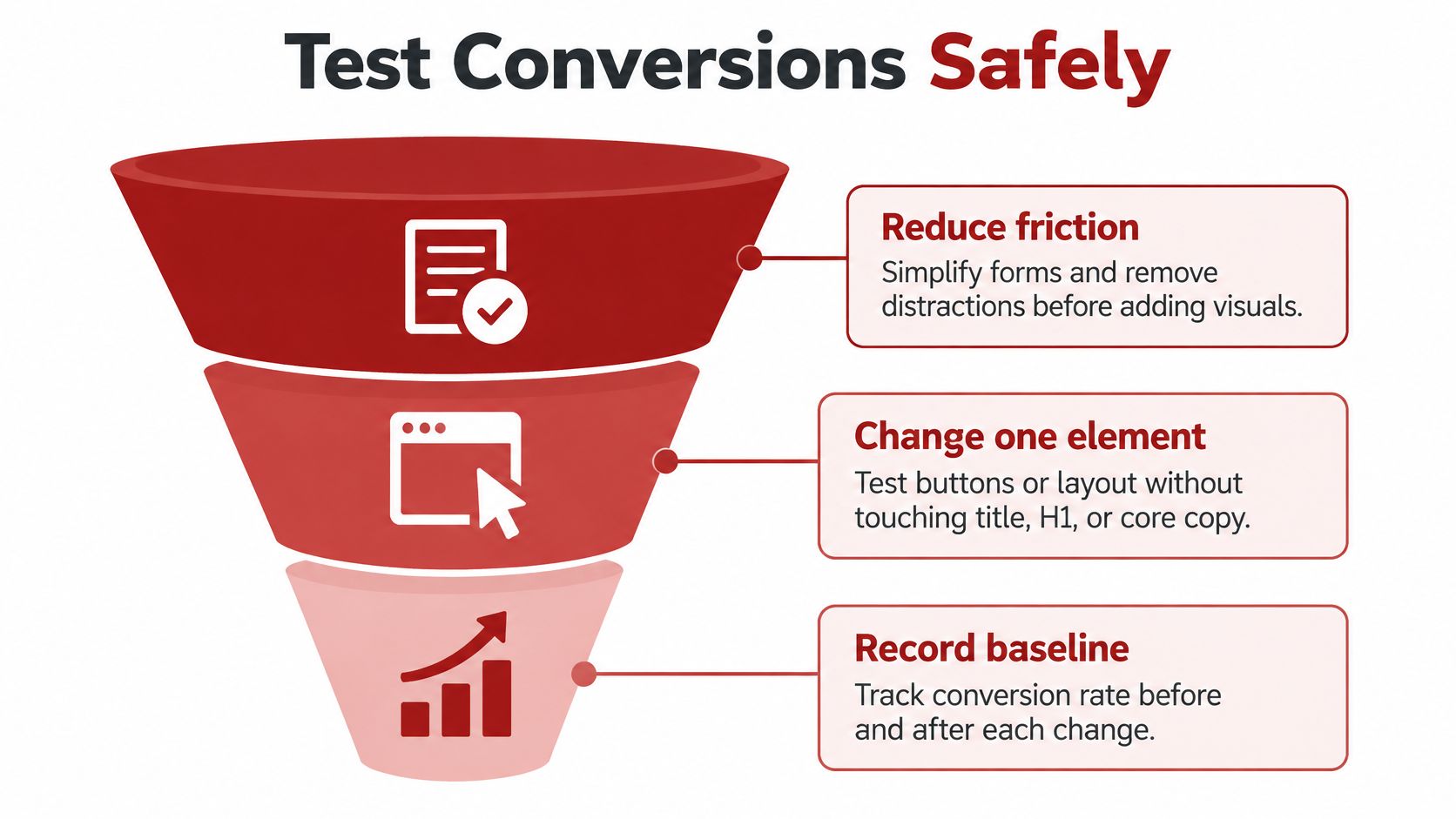
Record the baseline first. Sessions, calls, form completions and qualified leads for that page over the previous month. Without a baseline, every later comparison is a guess.
Build one low-friction variant that keeps the headline and service promise stable. Matching the headline, service, location and call to action to the search intent does more than any layout change. Order the page the way a high-intent visitor needs it: proof, scope, pricing or estimate expectations, then contact.
Test one change at a time. Fewer required fields, a specific call to action such as "Call for an estimate" instead of a generic Submit, reviews moved above the fold, or click-to-call placement on mobile. Use descriptive labels, enable browser autofill, explain why a phone number is requested, and show validation errors inline without clearing what's already typed.
Segment by device and traffic source. A form that works on desktop can stall on a phone in a truck, and paid traffic behaves differently from organic.
Judge winners by qualified calls or booked jobs. Raw submissions reward the wrong things, especially on pages where price shoppers fill every field.
Ecommerce checkout research is useful here as directional evidence, not as a forecast. Baymard Institute's checkout usability study found the average site could potentially increase conversion by 35.26% through checkout-design improvements alone, while the average US checkout displayed 23.48 form elements by default against an ideal flow of as few as 12. Those figures come from retail checkouts, not contractor lead forms, so treat them as a signal that friction costs money, not as a promised lift.
The pitfalls repeat across industries:
Copying ecommerce benchmarks as though a retail checkout and an emergency plumbing lead form carried the same intent.
Hiding service-area limits, which produces out-of-area inquiries that look like leads and behave like overhead.
Using vague buttons such as Submit or Send when the visitor wants to know what happens next.
Counting form completions while ignoring lead quality, the most common way a testing program flatters itself.
A monthly report keeps the testing honest, and it only needs five lines: the baseline, the variant tested, qualified calls, booked jobs, and the next test queued. Silva Marketing clients get a performance dashboard and report each month, a next-step roadmap, direct communication with their marketer and clearly defined KPIs, which is the format that makes those five lines easy to fill in.
Bring Your Page Data to a Free Strategy Call
Three checks are worth running before the next campaign. One service, one area and one tracked outcome per page. A title and H1 that describe the same service in the same place. Core Web Vitals read on mobile in Search Console rather than guessed at from a lab score.
If any of the three is shaky, a free 30-minute call is usually enough to settle the order of work. Silva Marketing's strategy session reviews your goals, audits your current marketing and maps a plan, with no pressure and no obligation.
Bring the service you want to rank for, the towns you serve, the calls and leads you track today, and the Search Console page report if you have one.
The decision stays yours. A page that matches its search and its tracked outcome is always the right place to begin.
Silva Marketing builds conversion-focused landing pages and the SEO behind them, from title and schema work to mobile speed and monthly reporting that ties each page to qualified calls instead of rankings alone. If you want a page that earns its position for one service in one town and proves it with calls, we can review yours and tell you what we'd change first. Visit Silva Marketing to book a free 30-minute call.
Comments