
What Is Robots Txt File? a Plain-English Guide for 2026

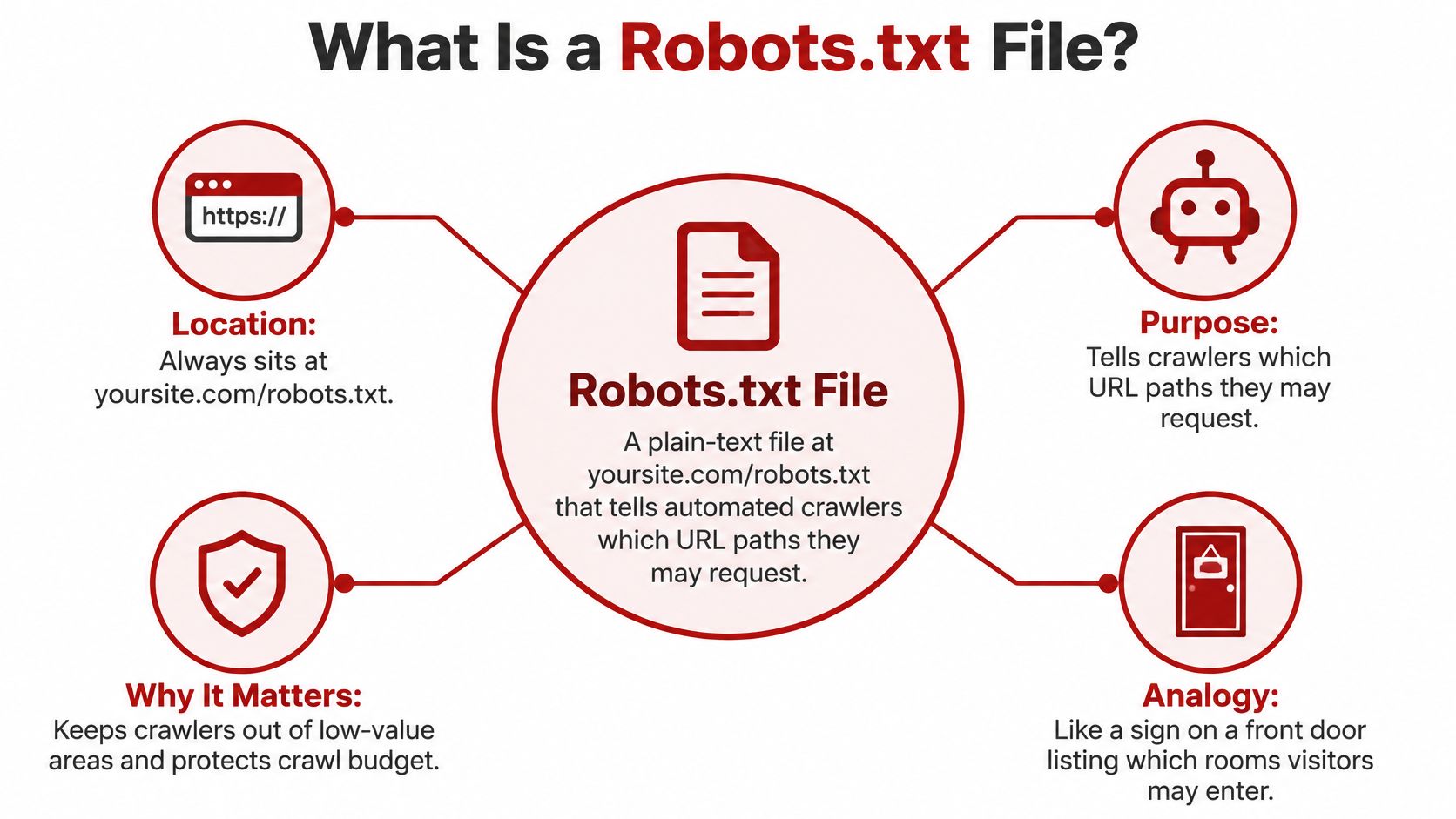
A robots.txt file is a plain-text file at the root of your domain, such as yoursite.com/robots.txt, that tells search engine crawlers which URL paths they may request. It controls crawling rather than hiding pages.
If a posted note on a shop door kept people out, every back room in town would be safe. It doesn't. The note only asks well-behaved visitors to skip certain rooms. One stray line in that file can ask Google to skip the service pages a Prescott plumber, roofer, or clinic actually needs found.
Silva Marketing is a Prescott-based digital marketing agency serving Prescott, Prescott Valley, Chino Valley, Dewey-Humboldt, and wider Northern Arizona. The problem on many local service sites is a misconfigured robots.txt that drops service pages out of Google while the owner still thinks those pages are protected or fine.
Table of Contents
What a Robots.txt File Is and Why It Matters - Does robots.txt hide pages? - Is a robots.txt file required? - Who reads it?
How Robots.txt Syntax Works, Line by Line - Robots.txt directives at a glance
Robots.txt Mistakes and Fixes That Protect Rankings - Mistakes that quietly remove local pages - What the HTTP status tells Google - Robots.txt symptoms, causes and fixes
Robots.txt Questions Local Business Owners Ask Most - Can robots.txt remove a page from Google? - How big can a robots.txt file be? - Does Crawl-delay slow Googlebot? - Do most websites have one? - Do subdomains share one file?
What a Robots.txt File Is and Why It Matters
A robots.txt file is a plain-text implementation of the Robots Exclusion Protocol. Under RFC 9309, it must be available at the origin's exact top-level path, , using lowercase naming, UTF-8 encoding, and the media type.
Think of it as a note on the front door that asks delivery drivers to use the side entrance and skip the stockroom. Honest drivers follow the note. The door stays unlocked.
Rules sit in groups that typically pair User-agent with Allow and/or Disallow. followed by asks every compliant crawler to avoid URLs that begin with . The practical job is crawl management. Leaving internal search results, filter combinations, staging folders, and heavy admin areas off the request list lets crawlers spend more visits on pages that earn calls.
A plumbing company in Prescott Valley might publish service pages for Prescott, Chino Valley, and Dewey-Humboldt, then watch a booking tool mint endless filtered URLs. A tidy file can point crawlers at the town pages and away from those filters. Crawl attention is limited. If bots burn visits on junk paths, the pages that name your trade and your town get fetched less often. That choice belongs with the rest of technical SEO, not instead of it.
The file applies by host and scheme, so a subdomain can need its own rules. Compliance is requested, not enforced. A noncompliant client can ignore the file. Private content still needs a password or a real access control.
Does robots.txt hide pages?
No. It asks compliant crawlers to skip a path. Anyone with the URL can still open it.
Is a robots.txt file required?
No. A missing file means no crawl restrictions from that file.
Who reads it?
Googlebot, Bingbot, and other crawlers that choose to follow the protocol.
How Robots.txt Syntax Works, Line by Line
The file is a stack of groups. Each group starts with a User-agent line that names the crawler, then one or more rules for that crawler.
A short public-site pattern looks like this.
User-agent: *
Disallow: /search/
Sitemap: https://yoursite.com/sitemap.xml
The star means every compliant crawler. asks them not to request URLs that start with that path. The sitemap line is a pointer, not a block.
Paths match from the start of the URL path. also matches , because that path begins with the same characters. Path values are case-sensitive, so and are different strings. A rule you meant for a folder can catch a live page if the names overlap.
You can write several groups when different crawlers should see different rules. Rules on one host do not cover another. , a bare domain, and a subdomain such as each need a file at that host's own root.
When rules overlap, Google applies the most specific matching rule. An empty line allows everything for that group. A folder can be blocked while one file inside it is allowed, if the allow path is more specific.
Robots.txt directives at a glance
Directive | What It Does | Example | Support Notes |
|---|---|---|---|
User-agent | Names the crawler the following rules apply to | User-agent: * | Required at the start of a group; * means all compliant crawlers |
Disallow | Asks crawlers not to request paths starting with this value | Disallow: /search/ | An empty value allows everything |
Allow | Permits a path inside a folder that is otherwise disallowed | Allow: /search/help.html | Google and Bing support it; in Google the most specific matching rule wins |
Sitemap | Points crawlers to your XML sitemap | Sitemap: https://yoursite.com/sitemap.xml | Not tied to one user-agent group; supported by Google and Bing |
Crawl-delay | Asks a crawler to wait between requests | Crawl-delay: 5 | Bing can honor it; it is not a Googlebot control |
Practical rule: If you cannot explain a line out loud to a coworker, do not leave it in the live file.
Comments can start with . Crawlers ignore those lines. Use them to note why a path is blocked so the next redesign does not "clean up" a rule you still need, or keep a rule you no longer do.
Robots.txt Settings for Local Service Websites in Prescott
Which pages should a Prescott-area service business let search crawlers request? For a typical site serving Prescott, Prescott Valley, Chino Valley, or nearby communities, start with the homepage, each service page, each location page, and the blog. Keep these pages crawlable. A location page can help connect a town with the service customers are looking for.
Use robots.txt to manage crawler requests for operational paths, not as a way to hide private information or improve rankings. A stray rule such as can also match , potentially keeping valuable service pages out of a search crawler's reach. Check the full path and its trailing slash before adding a block.
Paths that may not need crawling include:
Thank-you and confirmation URLs: These appear after a form submission or booking and often have no unique public information.
Cart, checkout, or booking confirmations: These are transaction steps rather than pages describing your services.
Internal search results: Search URLs can multiply quickly and often repeat content already available on your site.
or : A robots.txt rule can ask compliant crawlers to skip these paths, but it does not keep unfinished copy private. Protect staging sites with a password or other access control.
AI crawlers require a separate choice. In 2025, 88.9% of robots.txt files in DataDome's dataset explicitly disallowed OpenAI's GPTBot, according to DataDome's Global Bot Security Report. That figure describes the sites in the report, not what a Prescott contractor should choose. Decide whether you want a specific bot to request your pages, then place its rule in a separate group.

Silva Marketing reviews robots.txt settings during technical SEO work for regional businesses. The right rules depend on the site's pages and goals. A Prescott med spa and a Chino Valley HVAC company may need different settings, so avoid copying a block list without checking what each path matches.
How to Create, Upload and Test Your Robots.txt File
Build the file in the same order a careful launch uses. Each step has a reason and a check.
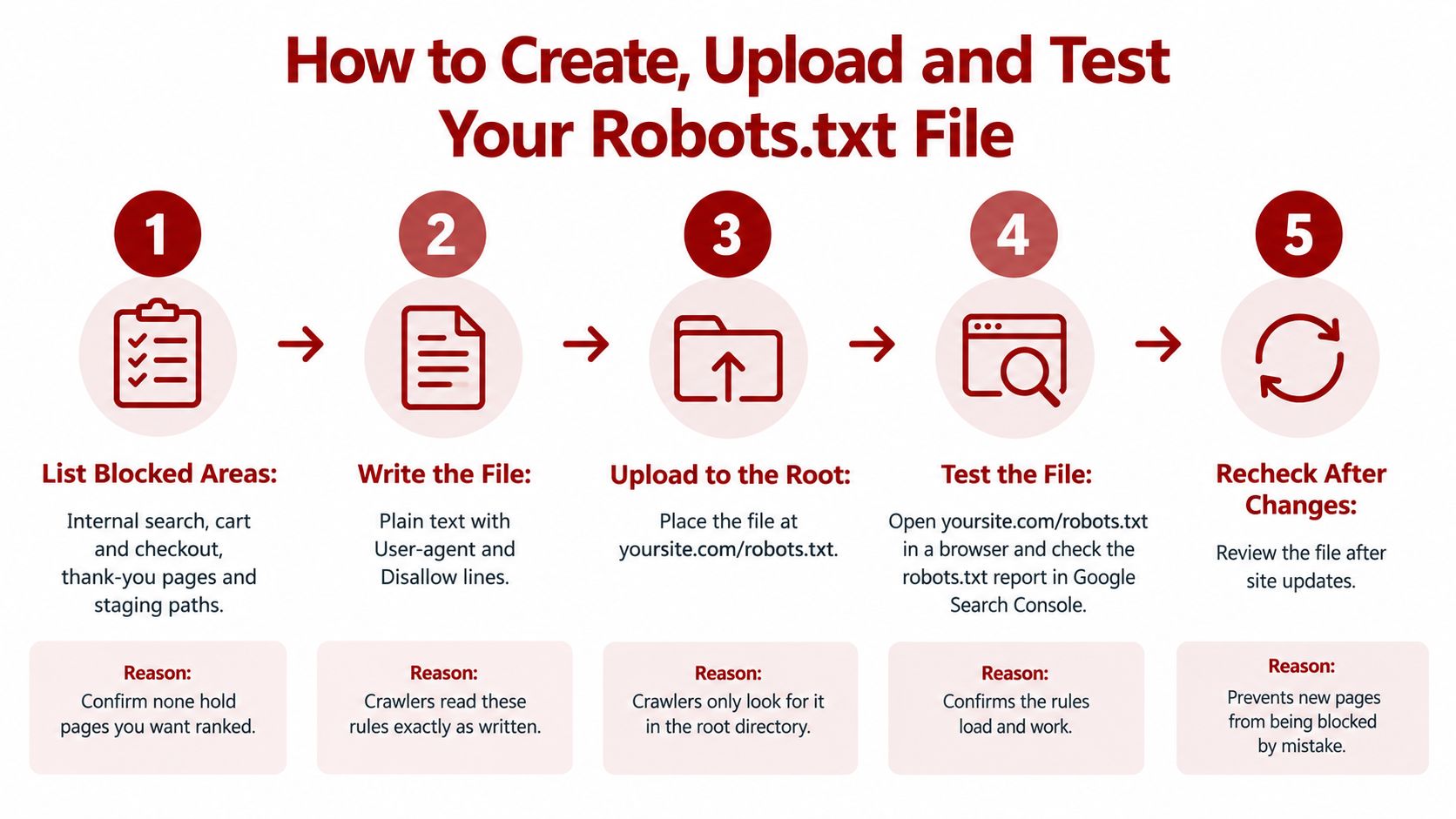
List the areas that should not be crawled, such as internal search, cart and checkout, thank-you pages, and staging paths. Confirm none of those URLs are pages you want ranked. If a location page is on the list, take it off.
Write the file in a plain-text editor and save it as in UTF-8, not as a Word document. RFC 9309 specifies UTF-8 and the media type, and crawlers read the characters exactly as stored.
Upload it to the root of the live domain so it loads at , not inside a subfolder. Crawlers look at the host root, for example , rather than . A file placed somewhere else does not control crawling for the whole host. WordPress sites often edit the file through an SEO plugin or the host's file manager. Shopify generates it from a template. Some hosted builders limit direct edits. After any theme, plugin, or template change, open the live URL again.
Open that URL in a browser. You should see plain text and a successful response, not a download prompt or an HTML error page.
Test the rules in Google Search Console's robots.txt report. Key service URLs should be allowed. The blocked paths should be only the ones you listed.
Add a Sitemap line, then submit the sitemap in Search Console. A clear sitemap is covered in these XML sitemap practices. The line does not replace the sitemap. It only points crawlers at it.
Recheck the file after every launch, redesign, or new URL structure. A template can restore an old block without a visible design change.
A Prescott HVAC company left this on the live site after a staging build.
User-agent: *
Disallow: /
That single slash asks crawlers to skip the whole host, including Prescott and Prescott Valley service pages. The replacement allows public pages and names only the operational paths.
User-agent: *
Disallow: /thank-you/
Disallow: /search/
Sitemap: https://yoursite.com/sitemap.xml
These rules are crawler instructions, not an access-control system. They ask compliant bots to avoid specified paths. They do not stop a person, or malicious software, from loading a URL directly.
A short walkthrough of how crawlers read the file is here.
Robots.txt Mistakes and Fixes That Protect Rankings
The mistake behind most failures is treating the file as an index switch. It controls crawling, not guaranteed indexing or search-result visibility. Google states that blocking a URL can stop the crawler from fetching the page, yet the URL may still appear in results if other sites link to it. Robots.txt is not a removal tool. Use it to manage crawl demand, not to hide a public page.
A block also keeps Google from seeing a tag on that URL. Pages that must stay out of Google's index need an indexing control the crawler can read, or a real access restriction. Blocking the page can hide the very directive you added to remove it.
Mistakes that quietly remove local pages
A sitewide left from staging: After launch, compliant crawlers are asked to skip every URL. Remove the slash-only rule.
Blocked CSS, JavaScript, or image folders: Google may not render the page the way a visitor in Dewey-Humboldt sees it. Allow the rendering resources.
Robots.txt used as a lock on a private page: Noncompliant clients can ignore it. Put a password on anything that must stay private.
A blocked URL you meant to deindex: The crawler may never read . Allow fetching until the page drops, then decide if a block is still useful.
A broad pattern such as : It can also match . Test the live service and town URLs before you keep the pattern.
A huge list of individual blocked URLs: Crawlers may stop processing past their parsing limit. Block a pattern, delete stale lines, and keep the file easy to audit.
Do not disallow important CSS, JavaScript, image, or other rendering resources when search engines need them to understand the page. A sound pattern allows normal public pages and excludes expensive or duplicate areas, such as faceted navigation or internal search, only after you confirm those URLs hold no unique content you want indexed. Revalidate the file when URL structures, CMS routing, or major sections change. How that demand is spent is part of crawl budget optimization.
What the HTTP status tells Google
The response code changes how Google reads the file, as described in Google's robots.txt specification.
A 2xx response: Google processes the rules the server returned.
A 4xx response other than HTTP 429: Google treats the host as if no valid robots.txt exists, so it assumes no crawl restrictions. A missing file often returns 404 and therefore does not block crawling.
A 5xx error: Google may temporarily stop crawling the site while it tries to fetch the file again, rather than treating the site as unrestricted.
Watch availability, redirects, and server errors. A file that looks right in one browser tab can still be the wrong response for Googlebot.
Robots.txt symptoms, causes and fixes
Symptom | Likely Cause | Fix |
|---|---|---|
Service pages missing from Google after launch | Disallow: / left over from staging | Remove the sitewide block, then request recrawling in Search Console |
Blocked page still shows in search results | Robots.txt stops Google reading a noindex tag | Allow crawling, add noindex, and block only after the page drops out |
Search Console reports a robots.txt fetch error | Server returns 5xx errors when the file is requested | Fix hosting or server stability, then retest the file |
Browser shows the file but Google finds none | The host Google requests does not return that file with a successful 2xx, or a redirect hides the real response | Serve directly from that host with a 2xx response and compare the report to the live URL |
Google renders pages incorrectly | CSS, JavaScript, or image folders are disallowed | Allow those folders so Google can render the page |
Changes do not appear in Search Console | Google uses a cached copy until it refetches the file | Wait for the refetch, then check the report and the live file again |
A corrected file does not restore rankings on the spot. Pages return as the crawler revisits them.
After each change, open Search Console's robots.txt report, run URL Inspection on a key service page, and give Google time to refetch the file.
Robots.txt Questions Local Business Owners Ask Most
Can robots.txt remove a page from Google?
No. Robots.txt controls whether crawlers fetch a URL. It is a traffic instruction, not a privacy lock: a blocked URL may still appear in search results. To keep a page out of Google, let Google crawl it and use a tag. Use password protection for private content.
How big can a robots.txt file be?
Under RFC 9309, crawlers must support parsing at least 500 KiB of a robots.txt file. Content beyond a crawler's parsing limit may be ignored, so keep the file short and easy to check. A single stray rule can block service pages along with the URLs you meant to restrict.
Does Crawl-delay slow Googlebot?
Google ignores . Bing's documentation says Bing supports the directive, so it may help manage Bingbot's request rate. It does not control Googlebot.
Do most websites have one?
Yes, a bit over half have a robots.txt file. One study found a file at the root of 55.6% of the top one million websites in 2025, according to arXiv. A separate 2023 study found a valid file for 56.0% of 74,300,729 hosts, according to the Padas-Lab robots.txt study. These figures cover different datasets and criteria, so they are not direct comparisons.
Do subdomains share one file?
No. Each host, including each subdomain, needs its own robots.txt file at its root. Its rules apply to that host only.
Confirm Your Robots.txt Before Your Next Website Change
Open and answer three questions before the next redesign or launch.
Does it block any service page or location page?
Does it block CSS, JavaScript, or image folders?
Does it name the sitemap?
If the answer to the first or second question is yes, or the third is no, review the file before you change the site. The check itself takes a few minutes. A template or CMS update can still rewrite the file later, so look again after every redesign. A launch checklist that includes this file is in this SEO migration checklist.
If the site serves Prescott or Northern Arizona and you want a second set of eyes, Silva Marketing offers free consultations to review crawl settings, technical SEO, and search visibility, with no long-term contract required. Confirm the current consultation terms in writing before you book.
Silva Marketing helps local service businesses in Prescott and Northern Arizona keep crawl settings aligned with the pages that should earn calls. If you want that file, your sitemap, and your service URLs checked together, visit Silva Marketing and ask for a consultation.
Comments