
Internal Linking Strategy SEO: A Step-by-Step Guide

You publish a service page, wait for calls, and hear nothing. The page looks fine on a phone, but visitors have no clear route to it from related pages, and search engines may have trouble finding it. A deliberate internal linking strategy for SEO connects useful pages and makes those routes easier to follow.
Silva Marketing is a Prescott-based digital marketing agency whose SEO work improves local search visibility through on-page optimization, content, links, and local SEO. Internal links can help organize that work: connect each service page to relevant supporting content, and connect city pages to services available there. A city page should reflect real coverage and offer useful local information, not exist just to create another link.
Table of Contents
Set Internal Linking Goals and Targets First - How Many Internal Links Should One Page Have?
How to Run an Internal Link Audit for SEO - How Do You Find Orphan Pages?
Map Site Architecture and Silos for Local Service Areas - What Is a Hub Page in a Service Business? - Should Every City Get Its Own Page?
Choose Anchor Text Readers Can Predict - Can I Use My Main Keyword as Anchor Text Every Time?
How to Build Internal Links in Six Steps - What Does This Look Like on a Real Page Set?
Tools and Templates for Tracking Internal Links - What Columns Does an Internal Link Tracker Need?
Measure Results and Decide Your Next Link Update - How Many Internal Links Is Enough, Based on Research?
Set Internal Linking Goals and Targets First
Internal links do three jobs. They help search engines find pages, they signal which pages matter most, and they give visitors a clear path to a call or quote. If a link doesn't help with at least one of those jobs, it's decoration.
Turn each job into a goal with one measurable target. Treat the numbers below as working ranges for a local service site, not rankings rules. Your site size, content depth, and real service coverage set the sensible end of each range.
Internal linking goals, signals and starting targets
Goal | Signal to check | Starting target |
|---|---|---|
Every important page is reachable | Important pages with zero internal inbound links | 0 orphan pages |
Core service page gets real context | Contextual links from relevant pages | 5 to 10 relevant contextual links |
City page connects to services | Links from a city page to its matching service pages | 3 to 5 relevant links, each useful to a local reader |
Guides feed conversion pages | Supporting posts linking to a service page | 2 to 5 relevant posts per service page |
Descriptive anchors | Share of generic anchors such as "click here" | None on key pages |
How Many Internal Links Should One Page Have?
There's no magic number that fits every page. A short contact page needs few links. A hub page that summarizes roof repair for several towns needs more, because it has more useful next steps to offer. I would judge the count by whether each link earns its place in the sentence around it.
Orphans are common even on polished sites. The HTTP Archive data reported for 2024 covered 12,740,104 desktop home pages, of which 1,020,976, or 8.0%, had zero internal links. That isn't your service page figure, but it shows how easily pages end up disconnected.
Say a Prescott plumbing company lists its water heater page only in its XML sitemap. Neither crawlers nor visitors get context for it from the plumbing hub, a Prescott Valley page, or a guide about replacement costs. Link it from those pages where water heaters are part of the job, and have Prescott Valley and Chino Valley pages link only to services crews deliver there.
Write your three goals on paper. Find the table row that matches your weakest page type, circle it, and start the audit there.
How to Run an Internal Link Audit for SEO
An audit is a comparison between the pages you think you have and the pages a crawler can reach. Run it in this order so you don't fix anchors on pages that shouldn't exist.
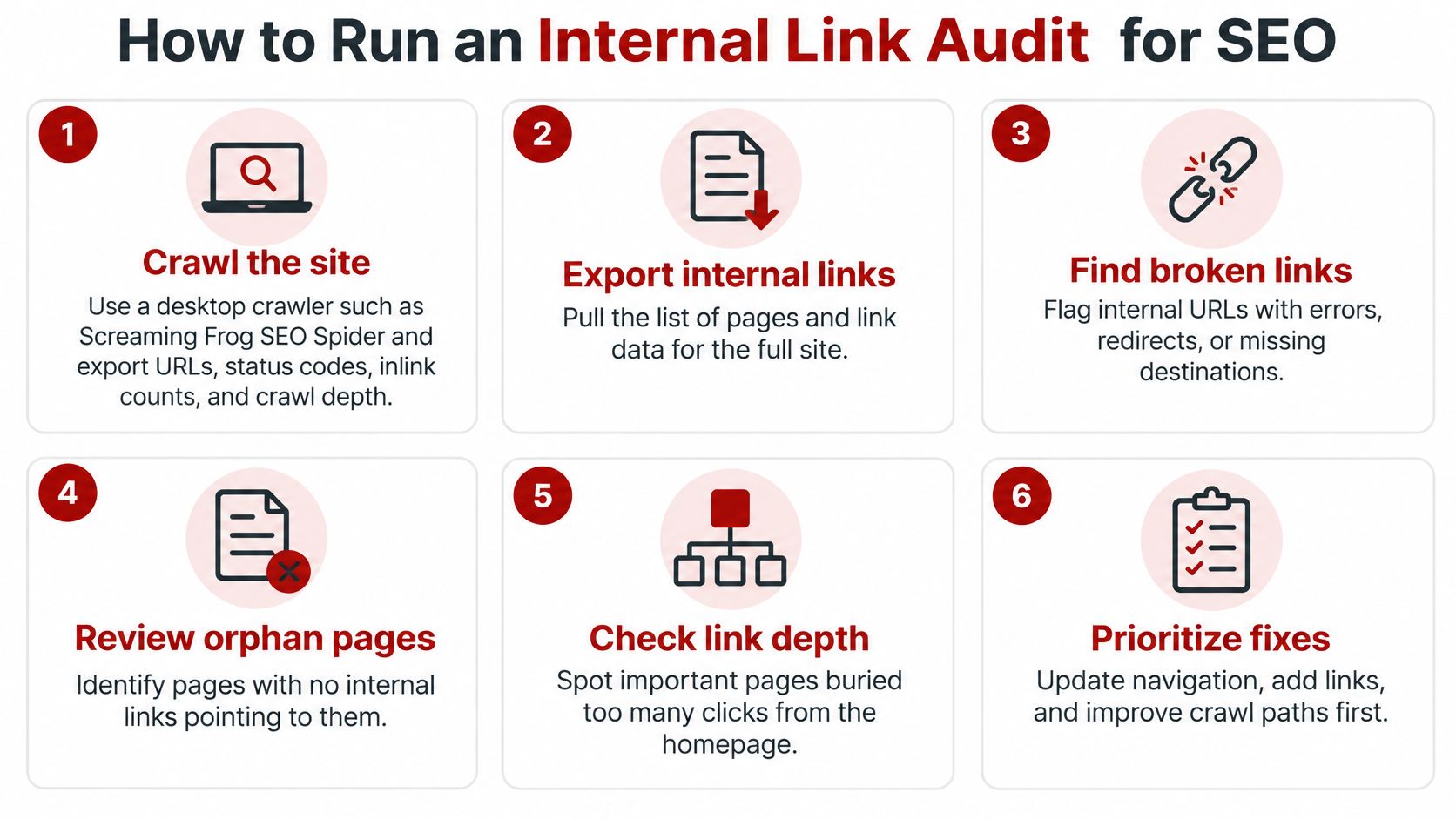
Crawl the site. Use a desktop crawler such as Screaming Frog SEO Spider and export URLs, status codes, inlink counts, and crawl depth.
Export your intended pages. Pull the list of pages you want indexed from your XML sitemap or CMS.
Compare the two lists. Pages in the sitemap with zero inlinks are your orphans.
Sort by inlinks. Flag service and city pages with only one or two references, especially pages that should drive calls.
Check click depth. Mark important pages more than three clicks from the homepage.
Review anchors. List anchors pointing to key pages and highlight "click here" or "learn more."
Cross-check the crawl against the Links report in Google Search Console. If Search Console shows a page as weakly linked and your crawl agrees, you have a confirmed gap, not a tool artifact. When broken destinations turn up, working through how to fix broken links on your website keeps that cleanup separate from adding new links.
How Do You Find Orphan Pages?
You find them by matching your sitemap or CMS list against the crawl's inlink count. Google Search Central guidance on crawlable links states that Google uses links to discover new pages and evaluate relevance, and it recommends that every important page receive a link from at least one other page on the same website. One inbound link is the minimum, not the goal for a money page.
Say a Chino Valley HVAC company has an AC repair page that appears only in its sitemap. Linking it from the cooling hub gives it structural context. Linking it from a seasonal maintenance post gives readers a reason to click when a tune-up reveals a failing unit.
Common internal linking problems and how to fix them
Problem | How to spot it | Fix |
|---|---|---|
Orphan page | Zero inlinks in the crawl but present in the sitemap | Link from one hub page and two related pages |
Buried money page | More than three clicks from the homepage | Add links from a category or hub page |
Generic anchors | Anchors such as "click here" or "learn more" | Rewrite the anchor to name the destination |
Sitewide link clutter | Dozens of unrelated links repeated in the footer or sidebar | Keep navigation that serves users and remove the rest |
Redirect chains | Crawl shows one URL redirecting through another before the final page | Update each link to the final URL |
Thin location pages | Near-identical city pages with no local detail | Add real local content, or merge the pages, before linking to them |
Log every issue in one spreadsheet with the URL, the problem, and the planned fix. That log becomes your work list, and it stops the same orphan from being rediscovered three months later.
Map Site Architecture and Silos for Local Service Areas
Start from the homepage and work down. The homepage links to service hubs such as roof repair, gutters, or HVAC. Each hub links to detail pages, city pages, and supporting guides. Those pages link back up to the hub and sideways to a related page when the relationship helps a reader decide.

What Is a Hub Page in a Service Business?
A hub page is the one page that summarizes a service and links to every page that goes deeper on it. For a Prescott roofer, the roof repair hub explains the service, the signs you need it, and how pricing works. From there it links to a hail damage guide, a Prescott Valley roof inspection page, and a Chino Valley repair page.
Siloing means grouping related pages so most links stay inside the group. Roof repair pages mostly link to other roofing pages, not to an unrelated gutter cleaning offer. Allow a cross-group link when it's useful, such as from a storm damage guide to gutter replacement after a roof is fixed. Planning that hierarchy before you publish is the core of site structure for SEO, and the URL folder matters less than whether a reader can follow the path.
Other industries use the same logic. A location hub for Miramar Beach homes for sale works as a starting page for that community, with deeper listing and area pages beneath it. On a contractor site, your Prescott hub plays that role for services instead of properties.
Should Every City Get Its Own Page?
No. Build a city page only where you serve customers, and give it local substance. Name the neighborhoods or travel areas you cover, the jobs you commonly do there, and any local permitting notes that affect scheduling. A page that swaps the city name into identical paragraphs adds links without adding value.
Internal links support local visibility, but they don't replace local signals. Google's guidance on local ranking identifies relevance, distance, and prominence as the three primary factors, with prominence influenced by information such as links from other websites, reviews, and positive ratings. Your internal structure helps relevance by clarifying which services you offer in Prescott, Prescott Valley, and Chino Valley. It cannot manufacture distance or prominence for a town you don't serve.
A clear hub with honest city pages beats a long list of thin location pages every time.
Draw the map on one page before you touch the CMS. If you can't explain why two pages link to each other in one sentence, they probably shouldn't.
Choose Anchor Text Readers Can Predict
A Prescott homeowner following a link from a hail-damage guide should know whether it leads to roof repair, replacement, or a general service page. Anchor text should name the destination clearly. Keep it concise and relevant, and avoid repeating one identical phrase across many pages when the surrounding context calls for different wording.
Anchor type | Example | Best use |
|---|---|---|
Service phrase | roof repair in Prescott | Main service page, linked from a city or hub page |
Area phrase | Prescott Valley roof inspections | Links from content about that community |
Question phrase | how to know if you need a new roof | Guide post pointing to a service page |
Business name | your company name | Contact, About or footer links |
Generic phrase | click here or learn more | Avoid for any link that matters |
Can I Use My Main Keyword as Anchor Text Every Time?
Use the main keyword when it fits the sentence, not as a default for every link. Repeating the exact phrase across dozens of pages adds little for readers and can make the links feel manufactured.
Match the wording to the source page and destination. A city page might link with “roof repair in Prescott” because location matters there. A hail guide could use “storm damage roof repair” to reflect the reader's concern. Both anchors should lead to a page that genuinely covers the service and area described.
The surrounding sentence should explain why the destination is useful. “If shingles are curling after a monsoon, compare repair and replacement options on our roof repair page” gives the reader context. A link placed in a footer list usually gives less guidance, unless that list is itself a useful services index.
Check local accuracy, too. An anchor that names a town you no longer serve or a service you no longer offer sends the wrong signal to a potential customer. Keep city and service wording aligned with the destination page and the coverage your business can provide.
Before publishing, read the anchor by itself and ask whether it predicts the page. Then read the full sentence: does the link give the reader a useful next step, and does the wording still match the destination? If not, revise it or remove it. One accurate link in context is more useful than several vague ones.
How to Build Internal Links in Six Steps
Build links one target page at a time. Bulk edits across a whole site usually produce anchors nobody reread and links in paragraphs where they don't belong.
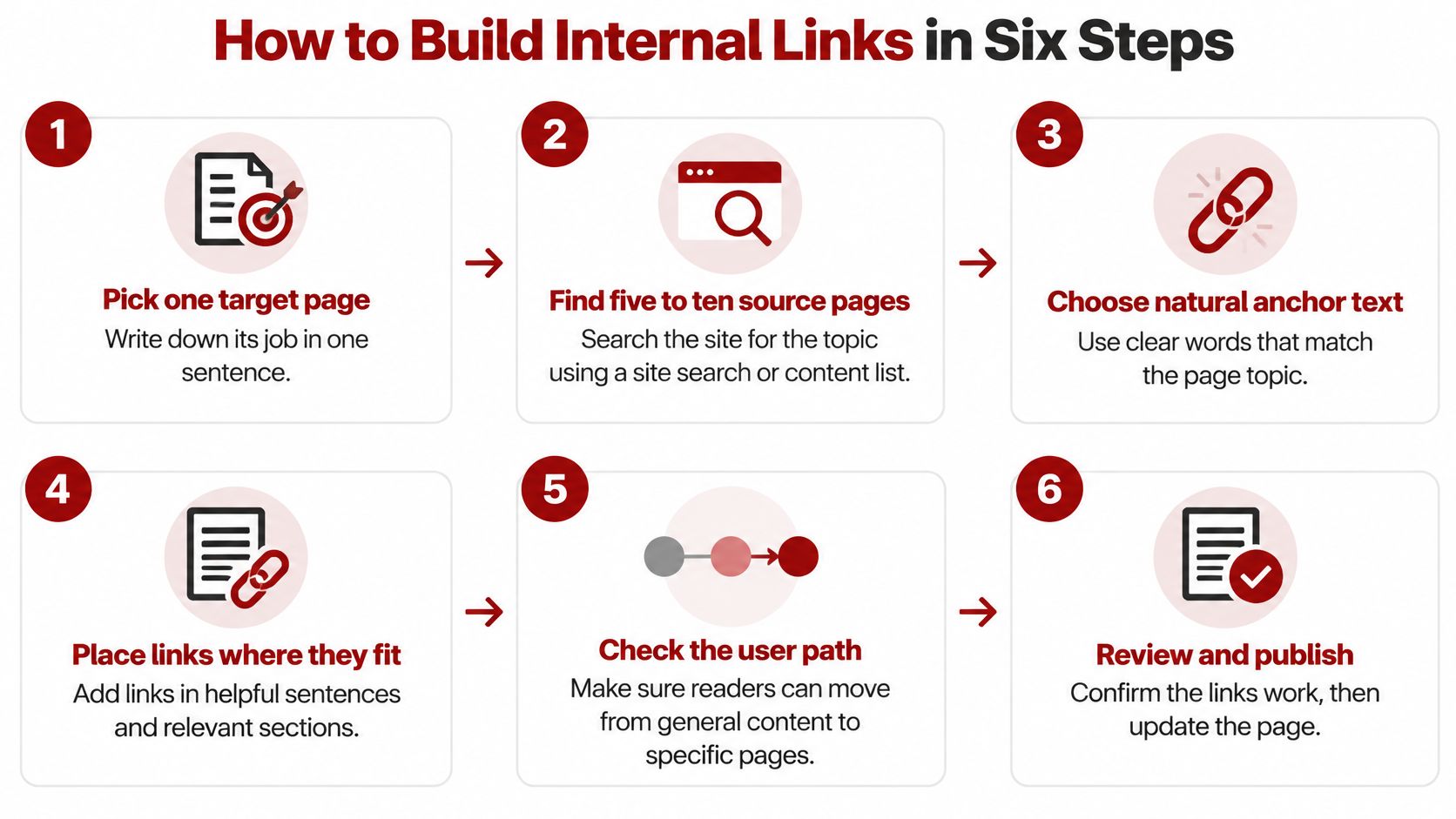
Pick one target page. Write its job in one sentence, such as "book roof inspections in Prescott Valley." If you can't state the job, fix the page before linking to it.
Find five to ten source pages. Search your site for the topic with a site search or your crawl export, then keep only pages a reader on that topic would plausibly open next. Start with source pages that already earn search impressions, because their links carry clearer context and your changes are easier to measure.
Choose the sentence. Place the link where a reader would want the next step, inside body copy. Skip footers and link lists unless the list itself is the main content, like a services index.
Write the anchor. Name the destination in words that fit the source paragraph, and vary the phrasing across pages when the context differs.
Add a link back. From the target page, link up to its hub or out to one related guide so the connection runs both ways and the page doesn't become a dead end.
Log and recheck. Record the change in your tracker, then recrawl after one to two weeks to confirm the link is live, crawlable, and pointing at the final URL.
What Does This Look Like on a Real Page Set?
Say a Prescott Valley landscaping company has a xeriscape installation page with no supporting content pointing to it. Following steps two and three, you'd search the site for drought, watering, and desert plants. You'd likely find four existing posts, perhaps one on drought-tolerant plants for Northern Arizona yards, one on watering costs, one on replacing thirsty lawns, and one on rock and decomposed granite options.
Each post gets one link, placed differently. In the plants post, the natural spot is the paragraph where a reader realizes they need a design, not just a plant list. In the watering cost post, it belongs where the numbers make installation worth pricing. Every anchor sits inside a sentence explaining why a reader might want the service, such as moving from plant choices to a full xeriscape installation plan. The installation page then links back to its landscaping hub and to the watering cost guide, so a visitor who lands there first can still research before calling.
That order matters. You used existing, relevant pages instead of writing four new posts or adding the service to every footer. The target page gained context from pages that already had topical weight, and each source page became more useful to its own readers.
Expect trade-offs. A source page can only carry so many helpful next steps before it reads like a menu, so choose the one or two destinations that match its intent. If two service pages compete for the same sentence, link to the hub and let the hub route the reader.
Common mistake: adding links in bulk without rereading the surrounding paragraph. The paragraph is what makes the link make sense.
Work through your audit list in priority order, money pages first, and stop after each target to confirm the new links read naturally out loud.
Tools and Templates for Tracking Internal Links
You don't need a large software stack. Four categories cover the whole workflow for a local site.
Desktop crawler. Screaming Frog SEO Spider exports inlink counts, crawl depth, status codes, and anchors. Its free version covers up to 500 URLs, which is enough for many small local sites.
Google Search Console. Use the Links report to see which pages receive the most internal links, and the Performance report to find pages with impressions but low clicks that may need better internal support.
XML sitemap. Your CMS sitemap is the list of pages that should be indexed, and it's the list you compare against the crawl to find orphans.
Spreadsheet. The work lives there between crawls.
Understanding how crawlers move through those pages connects directly to crawl budget optimization, since every wasted redirect or dead end is a crawl spent somewhere unhelpful.
What Columns Does an Internal Link Tracker Need?
Use seven columns, with one row per planned link.
Source URL. The page that will carry the link.
Target URL. The page the link points to.
Anchor text. The exact wording you published.
Placement in page. The heading or paragraph where it sits.
Date added. When the link went live.
Recheck date. When you'll confirm it's still live and accurate.
Status. Planned, live, or needs revision.
One row per link keeps the work visible. When a service changes or a page is retired, you can filter by target URL and update every source page in one pass instead of hunting through the site.
You can run this in-house if you have time to crawl, edit, and recheck on a schedule. If you'd rather hand off the crawl and reporting, a local agency such as Silva Marketing in Prescott can run the audit and technical SEO checks as part of a broader SEO consult, then leave you the tracker so the work stays transparent. Either route works, as long as someone owns the recheck dates.
Set up the spreadsheet with the seven columns today. Add your first ten planned links from the audit before you write any new content.
Measure Results and Decide Your Next Link Update
Measure in three layers, in this order. Each layer answers a different question, and skipping to traffic alone will mislead you.
First, check the crawl. Your orphan count should fall toward zero, and click depth for money pages should shrink toward three clicks or fewer. This layer only confirms the links exist and are crawlable. It says nothing about results yet.
Second, check Search Console. Compare impressions and clicks for each linked page before and after the update, over matching time periods. A page that gains impressions but holds the same click rate usually has a title or anchor problem, not a link problem, so fix the wording before adding more links. This is also where how to measure SEO ROI helps you connect search movement to revenue instead of reporting clicks alone.
Third, check outcomes. Count calls, form fills, and booked consults that start on linked pages. A service page with modest traffic that produces steady quote requests is outperforming a high-traffic guide that sends nobody anywhere.
How Many Internal Links Is Enough, Based on Research?
Use the large datasets as a benchmark for review, not a target to chase. The Zyppy analysis of internal links and Google Search clicks examined approximately 23 million internal links across 1,800 websites. Pages receiving only 0 to 4 internal links averaged roughly 2 Google Search clicks, while pages receiving 40 to 44 internal links averaged about four times as much traffic, and gains leveled off and began declining past approximately 45 to 50 internal links.
That's correlation, not a promise. Stronger pages naturally attract more internal links, and content depth, authority, and search demand all shape those averages. For a Prescott service site, the practical reading is narrower. Don't leave a core page stranded with one or two references, and don't stuff dozens of links at it expecting traffic to follow.
Review quarterly. Export a fresh crawl, compare it against your targets table, and pick the three pages with the largest gaps between importance and internal support. Fix those three well instead of touching thirty pages lightly. That's the same rhythm we use with clients, who each month receive a performance dashboard and report, a next-step roadmap, direct communication with their marketer, and clear measurable KPIs.
If you want a second pair of eyes, our free strategy session reviews goals, audits current marketing, and maps a plan, with no pressure and no obligation. We meet to align on goals and budget before any proposal, so you can decide with the full picture in front of you.
If your audit shows orphaned service pages or thin city pages across Prescott, Prescott Valley, or Chino Valley, we can map the hubs, anchors, and fixes with you and turn that map into a tracked work plan. Visit Silva Marketing to book a free strategy session, or start with the spreadsheet on your own and bring it to the conversation when you're ready.
Comments