
Google Ads Competitor Analysis: A Step-by-Step Workflow

You searched "water heater repair Prescott AZ" on your phone, and a rival sat in the top ad while your name was missing from the map pack. That one screen feels decisive. It isn't. Google Ads competitor analysis only holds up when you watch the same auctions over weeks, then ask why a local business also looks more trusted on Maps.
Silva Marketing is a Prescott-based digital marketing agency. We help local service businesses across Northern Arizona, including Prescott, Prescott Valley, and Chino Valley, see who is taking the calls. The problem is familiar. You are paying for clicks, someone keeps showing above you, and you cannot tell whether the gap is budget, ad quality, or local trust.
Say you want ten more booked jobs next month without a higher cost per qualified lead. That is the question worth answering. A single screenshot of a rival ad will not answer it.
Table of Contents
Set Your Objective and Identify Real Competitors - Sort the names before you track them
Read the Six Auction Insights Metrics - What each number is for
Collect Competitor Data When Auction Insights Falls Short - Why one search lies to you
Find the Keywords Rivals Actually Win - Three piles, then one warning
Audit Rival Ad Copy and Landing Pages - Put your ad next to theirs
Turn Competitor Gaps into Tests You Can Run - Judge the gap by booked work
Google Ads Competitor Analysis Questions and Answers - How many competitors should I track? - Why does Auction Insights show few or no rivals? - Can I see a competitor's exact bids? - Does Quality Score explain why a rival ranks higher? - How often should I check map pack rankings in Northern Arizona? - What tools find competitor keywords?
Set Your Objective and Identify Real Competitors
Write the business question before you open a tool. "More traffic" is not a goal. "More booked calls at a lower cost per qualified lead" is. Every rival you keep on the list should threaten that outcome in Prescott or a nearby town you serve.
Build the list from three sources, in this order.
Search the terms you bid on. In a private browser window, search each service-and-city term, such as "water heater repair Prescott AZ." Log every advertiser in the top and bottom ad slots. Do this once from Prescott, once from Chino Valley, and once from Prescott Valley. Results shift with location, so a rival who dominates one town may barely appear in the next.
Open Auction Insights on the same campaigns. Do this only after the campaigns have enough traffic to name rivals. The report shows who entered your auctions, not who merely exists in the category.
Run the same terms in Google Maps. Google's local ranking guide states that local results are mainly determined by relevance, distance, and prominence. Relevance is how well a Business Profile matches the search. Distance is how far the business is from the searcher, or from the location Google knows about. Prominence reflects how well known the business is, including how many websites link to it and how many reviews it has. More reviews and positive ratings can improve local ranking. A shop you never see in paid results can still take the call.
Sort the names before you track them
Split the list into three groups.
Direct rivals: Same service, same town. A Prescott plumber bidding on the same emergency terms as you.
Indirect rivals: They solve the same problem differently. A home-warranty brand, or a big-box store that books the install.
National brands: They bid on your terms but rarely roll a truck in Northern Arizona. Note them so they don't drown the local names.
A clean Google Ads campaign structure makes those town-level comparisons possible. Mixed services in one campaign blur who you are competing with.
Finish with three to five rivals you will track for the next 90 days. Next to each name, write one sentence on why they made the list. Paid visibility does not replace local trust. A competitor with strong reviews, complete business information, relevant services, local links, and proximity can convert better even when two advertisers get similar paid exposure. The point is not only to sit above another ad. It is to see why a local competitor looks more relevant, nearby, or established.
Keep the list short on purpose. Five names you can explain beat twenty names you only collected.
Read the Six Auction Insights Metrics
Open Campaigns, then Insights and reports, then Auction insights. Use it for Search campaigns. The report lists rivals who entered the same auctions in the period you chose. Thin data in a small local account is normal. It is not proof that nobody competes with you.
Google's Auction Insights documentation provides six comparison statistics: impression share, overlap rate, outranking share, position-above rate, top-of-page rate, and absolute-top-of-page rate. Impression share is your impressions divided by the estimated impressions you were eligible for. Eligibility depends on targeting, approval status, and Quality Score, so a low number is not always a bidding problem. Google also notes that Shopping Auction Insights data is available from October 2014 onward, which gives Shopping campaigns a long baseline if you run them. For most local service accounts, Search is the report that matters.
What each number is for
Metric | What it measures | What it signals | First action |
|---|---|---|---|
Impression share | Your impressions divided by the estimated impressions you were eligible for | How much of the available market you capture | Check budget, targeting, and approval status if it is low |
Overlap rate | How often a rival's ads show in the same auctions as yours | Shared demand between you and that rival | Compare the rival's ad copy for the queries you both win |
Outranking share | How often you rank above a rival, or show when it does not | Relative ranking pressure over time | Review ad relevance and landing page match on those terms |
Position-above rate | How often a rival ranks above your ad when both appear | Direct position comparison in shared auctions | Test ad assets or bid changes on the terms where it wins |
Top-of-page rate | How often your ad appears above organic results | Visibility at the top of the page | Check ad group relevance before raising bids |
Absolute top-of-page rate | How often your ad is the first ad shown | The strongest slot in the results | Bid higher only on high-intent terms where conversion economics hold |
Outranking share is the metric I would watch first. It counts how often you rank higher than another advertiser, or appear when that advertiser does not. Overlap alone only says you share demand.
Read the six together. High overlap means you and that rival want the same searches. Low impression share next to a rival's strong outranking share points to budget, targeting, ad quality, or landing-page performance. Segment every metric by campaign, location, device, and time period. A drop that only shows up on phones in Prescott Valley is a different problem from a drop across every town.
If you also want to benchmark competitors across search and AI, keep these auction numbers as the paid baseline and treat AI answers as a separate check. Don't mix the two into one score.
Never act on one metric alone. A high top-of-page rate with a weak cost per qualified lead is a visibility win and a business loss.
Collect Competitor Data When Auction Insights Falls Short
Narrow local terms often produce a short Auction Insights list. You still need a second source of evidence. The workflow below is the one I would start with when the report looks empty.
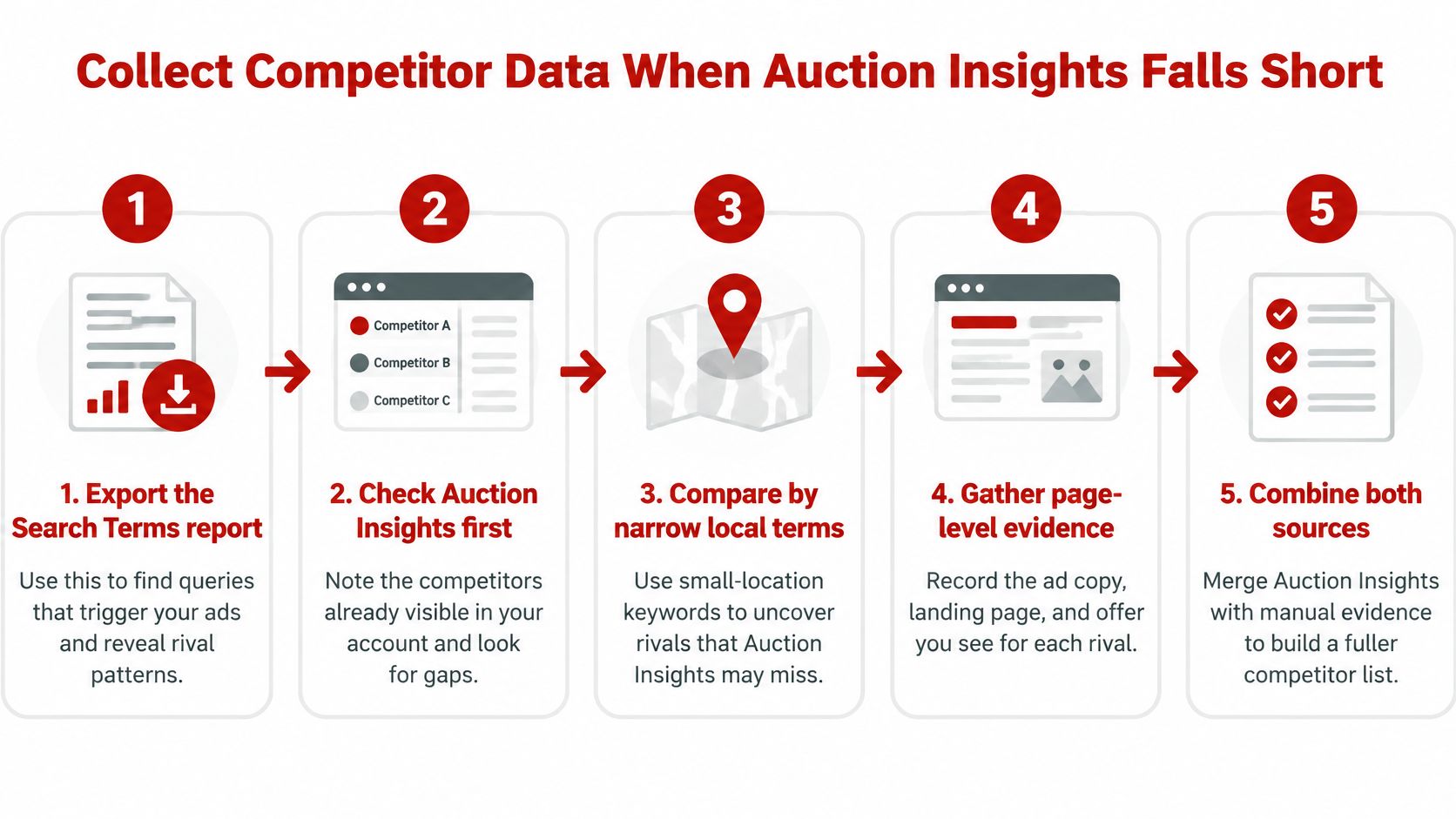
Export the Search terms report for the last 30 to 90 days. Mark queries that came from your service area, or that describe a problem a rival would also target, such as a leaking water heater rather than a brand name.
Search your top ten terms once a week. Use a private window, the same time of day, once per location and once on a phone. Log advertisers, headlines, descriptions, and extensions.
Save each snapshot with date, location, device, and query in one spreadsheet. Trends only show up if the columns stay the same.
After four weeks, count appearances. A rival in most snapshots is a steady competitor. A rival who appears once is noise.
Why one search lies to you
Google's Ad Rank explanation is clear that the auction does not rank ads by bid alone. Ad Rank uses bid amount, ad quality, minimum Ad Rank thresholds, the context of the search, and the expected impact of assets or other ad formats. Google calculates Ad Rank once to decide whether an ad can show, and again to set its position against other eligible ads.
Quality Score is reported on a 1–10 scale. It reflects estimated performance versus other advertisers, using expected click-through rate, ad relevance, and landing-page experience. Google says it is a diagnostic tool, not a direct input in the live auction. A rival's edge can come from bids, landing pages, messaging, assets, auction context, or several of those at once. Ad Rank can change on every search because competition, location, device, time, the query, other ads, and user signals change. One result from a desktop in Prescott at noon is not a stable ranking.
Source | What it shows | Main limitation | Effort |
|---|---|---|---|
Auction Insights | Rival impression share, overlap, and ranking metrics | Only shows rivals who entered your auctions, and it is thin in small accounts | Low |
Search terms report | Queries that triggered your ads and how they performed | Shows your side only, not rival ads or positions | Low |
Manual search logs | Which rivals appear, with their headlines and extensions | A snapshot that varies by location, device, and time | Medium |
Third-party ad tools | Estimated rival ad history and keyword footprints | Estimates rather than Google data, and often a subscription cost | Low to medium |
Don't draw a conclusion until you have at least four weeks of logs from more than one location, checked against Auction Insights where the report has data. If you later need public page lists at scale, you can crawl sitemaps through one API instead of opening every rival URL by hand. The spreadsheet is still the record you trust.
Find the Keywords Rivals Actually Win
A rival headline on "same-day tankless install Chino Valley" can look strategic and still be a dead term. Check demand before you copy the phrase.
Enter the terms you saw rivals use into Keyword Planner. Google's Keyword Planner guide says the Google Ads API can return historical metrics for as many as 10,000 keywords, including search volume, competition, and top-of-page bid metrics. You can also enter or upload a list for search-volume and forecast analysis. Forecasts estimate likely clicks, impressions, or conversions from a proposed spend. Those figures are planning estimates, not guarantees.
Add service-and-location combinations such as "drain cleaning Prescott" and "roof repair Chino Valley." Demand changes from town to town across Prescott Valley and the rest of Northern Arizona. A deeper pass on keyword research for Google Ads keeps that town split from turning into one bloated list.
Three piles, then one warning
Sort every term into one group.
They bid, you don't, and demand is real. These are the tests. Pair them with a proposed daily budget in the forecast before you add them.
You bid, they don't. That can be an advantage to protect. Don't drop the term just because a rival ignores it.
Little demand. A rival may be testing. You can skip it.
Watch the Low search volume status. Google's keyword status guidance says a keyword with that status is inactive until search traffic increases, so it will not currently trigger ads. Google applies it to keywords with very little or no search history, looking at worldwide searches over the previous 12 months. Even a small increase in query volume can reactivate the keyword. Google's own guidance is to remove it, find more ideas in Keyword Planner, or broaden the match type, for example from exact match to broad match.
A rival using a very specific exact phrase may not be getting impressions at all. Also watch problem searches such as "water in my basement." Rivals often catch those through broader matching, not through a keyword that names the service. Volume, match type, and the forecast should decide the budget, not the fact that you saw the phrase once.
Audit Rival Ad Copy and Landing Pages
Start with the job the searcher is trying to get done. Broader matching now reaches queries you never typed into the account, so a rival page may be chosen for a problem, not a service name.

Save each rival's headlines, descriptions, sitelinks, call assets, and offers on a coding sheet. Tag every line with four labels.
Offer: Free estimate, same-day visit, or emergency coverage.
Proof: Licenses, years in business, review count, or certifications.
Call to action: Call now, book online, or request a quote.
Location signal: Named towns or a service-area list.
Put your ad next to theirs
Use the same four labels on your own ads. Where a rival names Prescott, Prescott Valley, and Chino Valley and you name none, that is a message gap. Where their headline answers "water in my basement" and yours only says the company name, that is a message gap too. Write the gap in plain language, not as a score.
Then open the landing page with the same discipline. Look for a phone number above the fold, the service area in the text, form length, speed on a phone, and whether the page answers the problem named in the ad. A useful companion is a practical pass on Google Ads landing page optimization, because the page is what the auction and the caller both judge.
Reviews belong in this pass. A rival with far more reviews, and stronger ratings, can convert better at a similar ad position. Prominence on Maps and confidence after the click are the same local trust, seen in two places.
The coding sheet should change what you test, not what you copy. If their proof is a license number and yours is a slogan, test the license in the headline. If their page states same-day coverage for Northern Arizona and yours buries the hours, fix the page before you raise the bid.
A short walkthrough of how to read a live results page helps a owner who doesn't live in the account. This one stays on the mechanics of the results, not on a single rival's creative.
Turn Competitor Gaps into Tests You Can Run
A rival sitting above you on "water heater repair Prescott AZ" is a signal, not a diagnosis. The cause might be bids, landing-page experience, ad relevance, assets, or the context of that search. Don't assume the bid explains it.
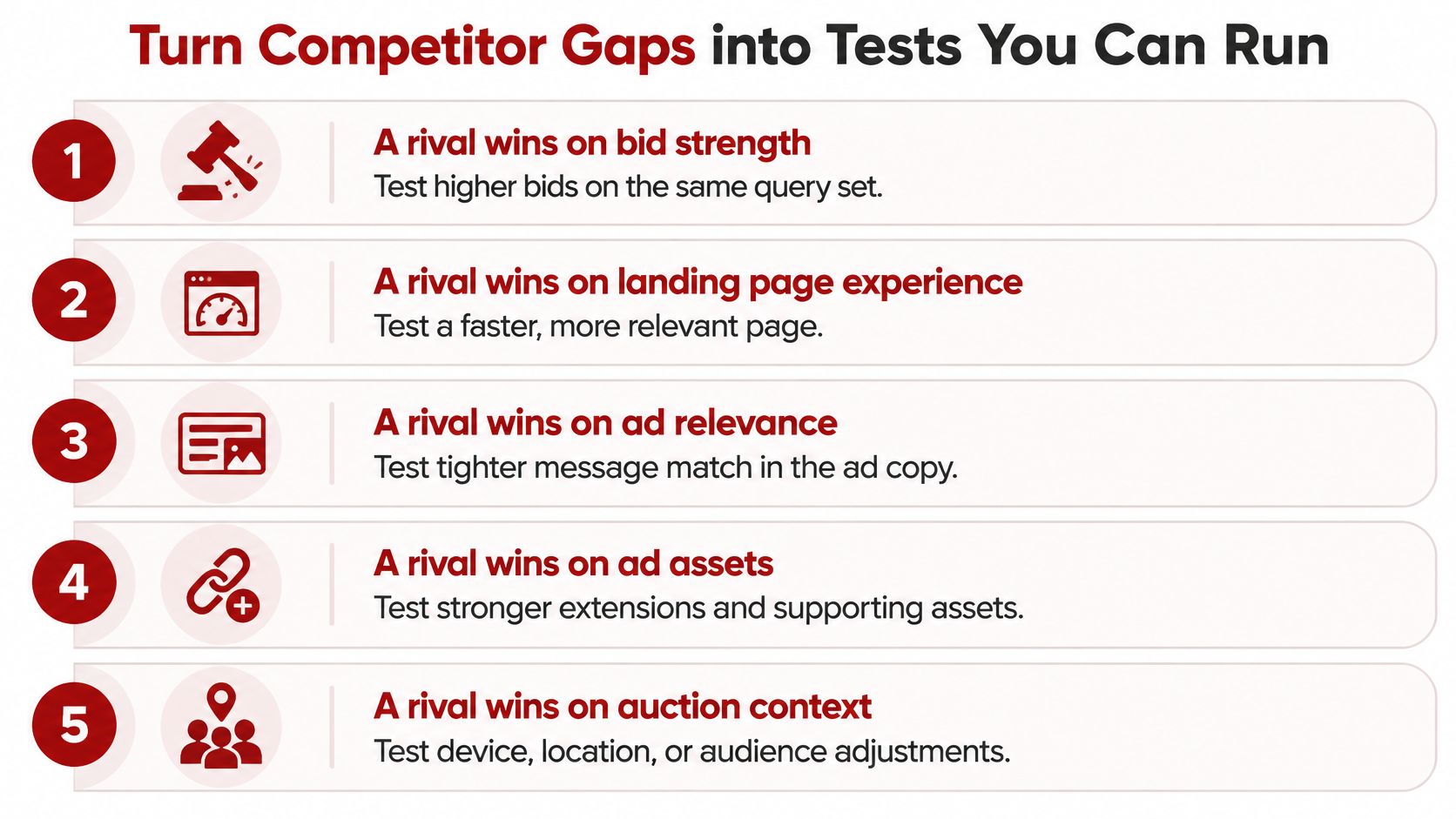
If they win the top of the page while your ad sits lower, tighten the ad group around that query and add call and sitelink assets before you touch bids. One change, then a written pass condition. For example, "Qualified calls from this ad group rise over the next two comparable weeks, and cost per qualified lead does not rise."
Signal | Likely cause | First test |
|---|---|---|
Rival top-of-page rate high, yours low | Rival bids or expected ad rank is higher | Tighten ad group relevance and add ad assets before any bid change |
Rival outranks you often while your impression share is high | Rival ad copy or landing page matches the query better | Rewrite headlines around the exact query and align the landing page |
Impression share lost to budget | Daily budget caps the campaign | Model incremental qualified leads, then test a capped budget increase |
Impression share lost to rank | Ad rank is too low for the auction | Improve relevance and landing page experience before raising bids |
High overlap, your cost per lead higher | Rival converts the same demand more cheaply | Compare landing pages and call handling, then test one page change |
Rival visible on a term you never bid on | Keyword gap or low search volume | Check Keyword Planner volume and match type before adding the term |
Judge the gap by booked work
Click-through rate is a weak benchmark. A federal court record citing Google materials states that invalid clicks averaged less than 10% of AdWords clicks. Google does not publish a single aggregate Search invalid-click rate, so that older display-era figure is not a Search target to copy. Build a keyword-level matrix with competitor presence, ad position signals, search-term intent, CPC, conversion rate, cost per qualified lead, and impression share lost to budget versus rank.
Strip spam calls and unqualified leads before you calculate a competitor-driven cost per acquisition. Look for repeated device patterns, sessions with no engagement, odd time-to-conversion, and what the CRM says happened to the lead. If a rival seems to win mainly through budget, model the extra qualified leads before you spend more. Validate with a comparable time window or a geographic split, and keep conversion definitions and attribution settings constant. Ongoing Google Ads campaign optimization is that loop, not a one-time bid change.
If the office needs a short briefing on a page test, tools that create videos with AI can turn the before-and-after into something the people answering the phones will watch. One test per gap. Write the pass condition before launch.
Set Up Your Monthly Competitor Review
Pick one day each month and pull the same inputs, or the months won't compare. Use Auction Insights and the Search terms report from Google Ads. Check Google Maps by hand from Prescott, Prescott Valley, and Chino Valley. Note call quality from call tracking or the CRM. Set the results next to the goal you wrote at the start, then record one decision: keep, change, or stop.
Metric | Where to pull it | How often | Question it answers |
|---|---|---|---|
Impression share and lost share by budget or rank | Google Ads campaign columns | Monthly | Are we losing demand to budget or to ad rank? |
Overlap rate and outranking share | Auction Insights | Monthly | Which rivals now compete with us most? |
Cost per qualified lead | Google Ads plus CRM lead disposition | Monthly | Is a rival advantage costing us booked work? |
Call quality (answered, qualified, booked) | Call tracking and CRM | Monthly | Do rival-influenced searches produce real jobs? |
Map pack position for core terms | Manual Google Maps check from three towns | Monthly | Where do rivals outrank us locally? |
Review count and rating versus top rivals | Google Business Profile and public listings | Quarterly | Do trust signals explain the gap? |
Review counts and ratings belong on a quarterly pass. They move slower than bids, and they often explain a gap the auction report cannot. A rival who gained thirty reviews in Prescott can win the call at the same ad position you held last quarter.
Each month, clients receive a performance dashboard and report, a next-step roadmap, direct communication with their marketer, and clear measurable KPIs. You can copy that shape in a spreadsheet: numbers, one decision, and the next test. We've launched more than 500 websites, and the review still starts with the same table, because a fast site doesn't tell you who entered the auction.
If you want a second set of eyes, Silva Marketing offers a free 30-minute call to talk through your goals. The free strategy session reviews goals, audits current marketing, and maps a plan, with no pressure and no obligation. The monthly review works either way. Start with the table.
Google Ads Competitor Analysis Questions and Answers
How many competitors should I track?
Three to five rivals for 90 days is enough to see patterns without losing focus. For a Prescott contractor, that usually means two direct local shops, one indirect option, and at most one national brand that serves Northern Arizona.
Why does Auction Insights show few or no rivals?
It only reports rivals who entered the same auctions in the period you selected. Thin data in a small local account is normal, especially on narrow town-and-service terms.
Can I see a competitor's exact bids?
No. Auction Insights shows comparison metrics such as overlap and outranking share, not rival bids. Read position and overlap signals, then check your own cost per qualified lead.
Does Quality Score explain why a rival ranks higher?
Not on its own. Google treats Quality Score as a diagnostic, not a direct input to the auction. A higher visible score does not prove a higher live rank on the next search in Prescott Valley.
How often should I check map pack rankings in Northern Arizona?
Check monthly from Prescott, Prescott Valley, and Chino Valley. Local results shift with the location of the search, so one office check is not the whole service area.
What tools find competitor keywords?
Start with your Search terms report, weekly manual searches, and Keyword Planner. Through the Google Ads API, Keyword Planner can return historical metrics for up to 10,000 keywords, which is enough when a rival's footprint looks large.
Silva Marketing helps local service businesses in Prescott and across Northern Arizona read auction data, map-pack trust, and call quality as one review. If you want that workflow applied to your account, visit Silva Marketing and book a free 30-minute call to walk through your goals.
Comments