
10 Technical SEO Best Practices for Local Businesses

A Prescott homeowner pulls out a phone, searches for a plumber, and taps the first result that loads quickly and shows a clear phone number. That moment looks simple, but it depends on the systems beneath the page. Technical SEO helps search engines crawl the site, index the right pages, understand the business, and deliver a usable experience when a local customer is ready to call.
Silva Marketing is a Prescott-based digital marketing agency serving local service businesses across Prescott, Prescott Valley, Chino Valley, and surrounding Northern Arizona communities. The agency helps contractors, home-service companies, and growing local brands fix the technical problems that hide useful pages, slow down mobile visitors, or make contact details difficult to find.
This checklist ranks 10 technical SEO best practices around the moment a customer calls. Each item connects a technical fix to a Northern Arizona service-business scenario, identifies a common mistake, and gives you a practical way to verify the work. For additional background, see this guide to technical SEO fundamentals from Data Hunters Agency.
Table of Contents
1. Make Sure Search Engines Can Crawl Your Site - What to check before a launch
2. Build a Clean XML Sitemap So Google Finds Your Important Pages - What belongs in the sitemap
3. Control Duplicate Content with Canonical Tags and Indexation Rules
4. Design Site Architecture and Internal Linking That Guides Crawlers and Visitors - Let customer intent shape the links
5. Serve Every Page Over HTTPS and Maintain Site Security - Verify the complete migration
6. Build for Mobile-First Indexing and Click-to-Call Experiences - Test the page like a customer
7. Improve Core Web Vitals and Page Speed Where Visitors Feel It - Fix the elements that affect calls
8. Add Structured Data That Matches Your Visible Content - Validate before publishing
9. Fix Redirects, Status Codes, and Broken Links Before They Cost You Visibility - Map the old site before changing it
10. Build a Technical Local SEO Foundation for Map Pack Visibility - Make service-area pages genuinely useful
1. Make Sure Search Engines Can Crawl Your Site
Crawl access is the first gate. If Googlebot or Bingbot can't reach an important service page, that page has little opportunity to appear for a customer searching in Prescott, Prescott Valley, Chino Valley, or elsewhere in Northern Arizona.
Your file sits at the root of your domain and tells crawlers which paths they may request. It controls crawling, not indexing. A URL blocked in can still appear in search if another site links to it, because Google may know the address without being able to read the page. If you want a page excluded from search results, keep it crawlable and use a directive.
A common launch mistake is leaving in place after a development site goes live. A Prescott contractor might also block too much while trying to hide or internal search results, accidentally preventing Google from reaching service pages. Review the file directly in a browser after every redesign.
What to check before a launch
Important pages: Confirm service pages, city pages, images, CSS, and JavaScript needed for rendering aren't blocked.
Private areas: Block administrative paths and internal search results when appropriate, but don't block the public content that supports leads.
AI crawler access: Decide deliberately whether crawlers such as GPTBot, ClaudeBot, and PerplexityBot may access your content. Blocking them may reduce how often your business appears in AI-generated answers.
Sitemap reference: Include a line pointing to the correct XML sitemap.
Test the rules in Google Search Console and compare the live file with the version used on staging. Silva Marketing also uses crawl budget optimization guidance when larger or technically complex sites need closer review. For another perspective on indexation problems, see this explanation of crawled but currently not indexed issues.

2. Build a Clean XML Sitemap So Google Finds Your Important Pages
An XML sitemap gives search engines a structured list of the URLs you want them to discover and consider for indexing. It doesn't guarantee that Google will index every URL, but it provides a dependable map for new service pages, new location pages, and content that isn't well connected through internal links.
For a local business, the sitemap should focus on useful pages. That usually means core services, legitimate service-area pages, important resources, and key company pages. It shouldn't contain redirected URLs, noindexed pages, duplicate parameter variations, or outdated locations.
What belongs in the sitemap
A Prescott home-services company may organize its sitemap around service and location content. A multi-location brand could separate files by category and use a sitemap index when the site becomes large. The important principle is simple: every included URL should be canonical, indexable, and return a normal successful response.
Google ignores and fields. The field is useful only when the date accurately reflects a meaningful page update, not when software changes it automatically every day.
After a redesign, submit the sitemap in Google Search Console and monitor the Page indexing report. If a Prescott Valley business adds new service pages but those URLs remain excluded, the sitemap can help identify the gap, but it won't replace useful content or internal links.
Practical rule: A sitemap should describe the pages you want search engines to value, not every URL your content management system happens to generate.
Automate the file so it updates when pages are added or removed, then review it regularly. Silva Marketing explains the process in its guide to XML sitemap best practices.
3. Control Duplicate Content with Canonical Tags and Indexation Rules
A Prescott service company can create duplicate URLs without realizing it. Common causes include HTTP and HTTPS versions, www and non-www addresses, tracking parameters, filtered listings, printer-friendly pages, and copied city pages.
Search engines must then choose which version to index and rank. A tag identifies the preferred URL, but Google treats it as a strong hint, not an absolute command. A directive gives a clearer instruction to exclude a page from search results.
The distinction matters when a Northern Arizona business serves several communities. If its Prescott, Prescott Valley, and Chino Valley pages use the same paragraphs with only the city name changed, canonical tags do not address the underlying weakness. Each legitimate location page should describe the services, coverage, team, project types, or customer needs that apply there.
Use this review sequence:
Choose one domain version: Redirect alternate HTTP, HTTPS, www, or non-www URLs to the preferred address.
Use absolute URLs: The canonical tag should name the complete preferred URL.
Self-canonicalize indexable pages: A page intended to rank should generally point to itself, unless the site has a deliberate consolidation strategy.
Check Search Console: Review statuses such as “Duplicate, Google chose different canonical” and “Excluded by noindex.”
Test the result by opening alternate URL versions, checking the page source for the canonical tag, and reviewing the affected URL in Search Console.
A Prescott company may find that Google selected another city page as canonical because the pages contain almost no unique local information. Rewrite those pages around real service differences before adding more canonical tags. That fix gives customers a clearer reason to call the right local team.
4. Design Site Architecture and Internal Linking That Guides Crawlers and Visitors
A caller looking for water-heater repair in Prescott should reach the service page quickly, then find the phone number without returning to the homepage. Your site structure should support that same decision path for every service and community you serve.
Connect the homepage to major services and location pages. From each service page, link to the communities where that service is available. From each community page, link back to the relevant services. A contractor serving Prescott, Prescott Valley, and Chino Valley might connect a plumbing page with each location page, while keeping unrelated services out of that path.
The common mistake is creating pages that exist but have no internal links pointing to them. These orphan pages may appear in an XML sitemap, yet visitors and crawlers have no normal route to discover them. A multi-service company could publish a valuable water-heater page while the homepage, plumbing page, and navigation never reference it.
Let customer intent shape the links
Use descriptive links at the point where a visitor needs more information. A Prescott Valley roof-repair page can link to "roof repair in Prescott" when that destination is relevant. A Prescott community page can send visitors directly to plumbing, HVAC, or electrical services. Breadcrumbs can clarify the path from a service category to a specific service and location.
Avoid “click here.” The anchor should tell people what they will find, without repeating a keyword unnaturally.
For a broader planning framework, see site structure for SEO.
Verify the structure by crawling the site, reviewing internal-link counts, and opening key pages as a customer would. Start with the pages tied to calls and quote requests. The strongest architecture shortens the route from a local problem to the right service and phone number.
5. Serve Every Page Over HTTPS and Maintain Site Security
HTTPS encrypts the connection between a visitor's browser and your website. For a local service company, that matters when someone submits a contact form, shares project details, or decides whether the business looks professional enough to call.
A secure site should use one preferred HTTPS version everywhere. HTTP URLs should permanently redirect to HTTPS, and internal links, canonical tags, sitemaps, directory listings, and the Google Business Profile website link should all use the secure address. A certificate alone isn't enough if older URLs and embedded resources still point to HTTP.
Verify the complete migration
A regional business moving from HTTP to HTTPS should check more than the homepage. Review service pages, forms, images, scripts, canonical tags, and redirects. Mixed content, where a secure page loads an image or script over HTTP, can trigger browser warnings or prevent a resource from working correctly.
Set certificate renewal to happen automatically and keep a calendar reminder as a backup. Test the certificate and protocols with a reputable SSL checker, then add the HTTPS property in Google Search Console. Confirm that citation listings and the Google Business Profile don't send visitors to the old address.
A certificate that expires can produce a full-page browser warning before a customer sees the phone number. That technical failure becomes a trust problem immediately.
HTTPS is only one signal, and it won't make an irrelevant page rank. It does create a safer, more credible foundation for every other SEO and conversion effort.
6. Build for Mobile-First Indexing and Click-to-Call Experiences
Google's mobile-first approach means the smartphone-rendered version of a page is generally the version search systems use to understand and index it. A desktop page can look complete while its mobile version omits service text, internal links, images, metadata, structured data, or contact controls.
For a Prescott homeowner searching for an electrician or plumber, the next action is often immediate. A responsive layout, readable text, stable buttons, and a prominent tap-to-call link reduce friction between the search result and the conversation.
Test the page like a customer
Open the page on a phone and answer a few practical questions:
Can the phone number be seen quickly? Put the primary number and contact action where a visitor can find them without unnecessary scrolling.
Does the number work? Use a proper link and test it on more than one device.
Is the mobile content complete? Compare the rendered mobile and desktop versions for service information, links, images, and structured data.
Does anything cover the content? Avoid intrusive interstitials that hide the page when it loads.
A Prescott Valley company replacing a desktop-oriented layout may improve the experience by standardizing tap-to-call controls across its location pages. The technical change supports both indexing and lead generation.
Use Google's Mobile-Friendly Test and URL Inspection tool, then test real templates rather than only the homepage. For more implementation ideas, see this guide to instant call links for your business.
7. Improve Core Web Vitals and Page Speed Where Visitors Feel It
Page speed matters when a Northern Arizona customer is trying to call. A large hero image can delay the phone number, a heavy script can slow a form, and an unreserved image can shift the call button under a visitor's finger.
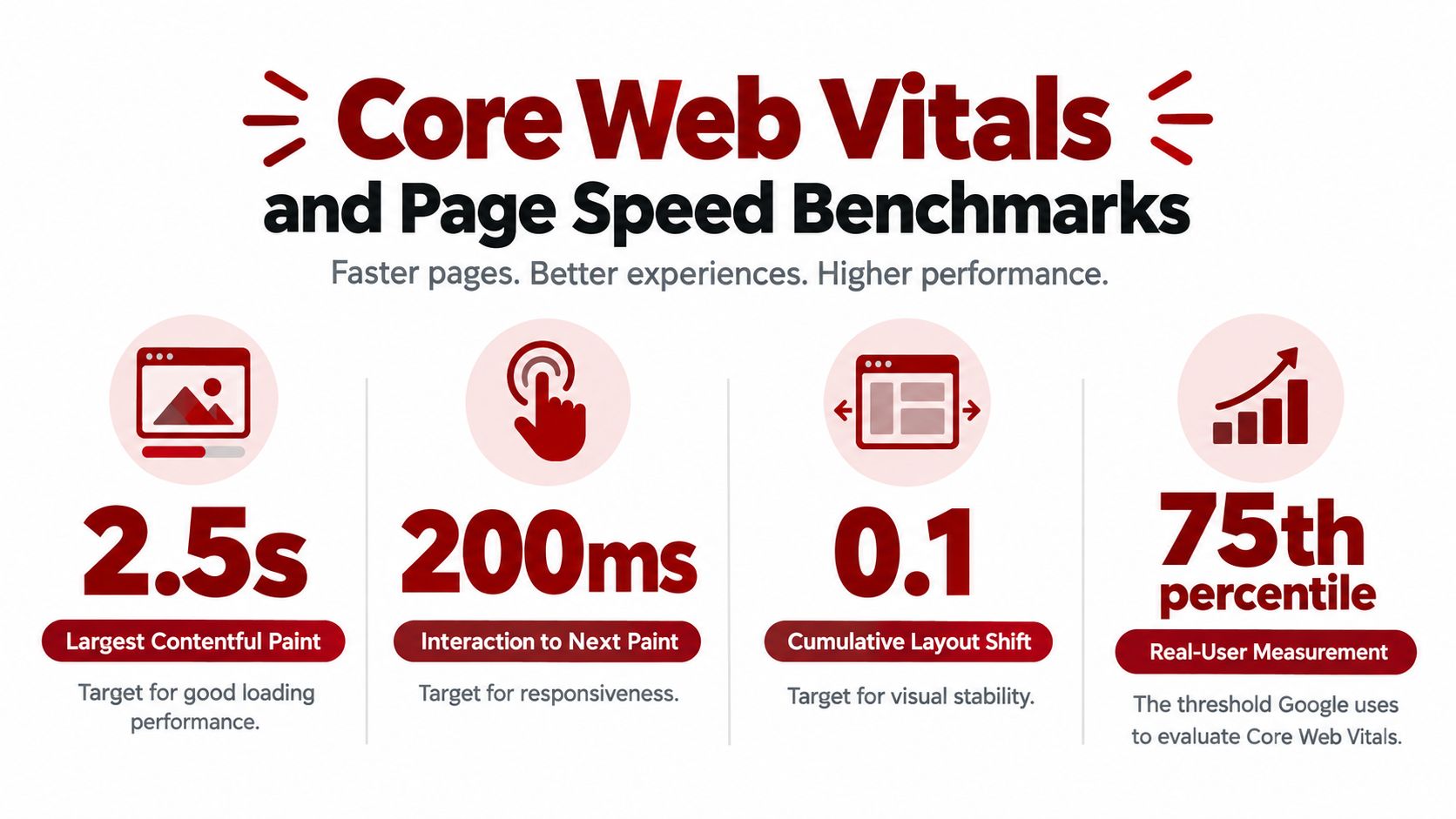
Google's Core Web Vitals turn these problems into measurable targets. A good Largest Contentful Paint is within 2.5 seconds, a good Interaction to Next Paint is below 200 milliseconds, and a good Cumulative Layout Shift is below 0.1, according to Google's Core Web Vitals guidance. The HTTP Archive explains that businesses should assess these metrics at the 75th percentile, with mobile and desktop results evaluated separately.
Fix the elements that affect calls
For an electrician serving Prescott or a plumber in Prescott Valley, prioritize the page elements a caller needs:
Large images: Compress hero and project images, then serve WebP or AVIF where supported.
Layout movement: Set explicit width and height values for images and videos.
Slow interaction: Remove unnecessary JavaScript and review third-party widgets.
Delayed primary content: Prioritize the headline, phone link, form, and relevant hero image above the fold.
The common mistake is optimizing a lab score while overlooking the call path. Search Console's Core Web Vitals report shows field performance for groups of real users. Lighthouse and PageSpeed Insights help diagnose individual pages, but test a mobile page with its map, form, and call button as well.
A practical explanation of how these metrics relate to page experience is available in this video:
Treat the thresholds as a diagnostic floor, not a finish line. A page can pass every metric while a real mobile visitor still fumbles the call button. Verify the fix by loading the service template on a phone and completing the call or form action.
8. Add Structured Data That Matches Your Visible Content
A customer in Prescott taps your site, checks that you serve their area, and calls. Structured data should support that exact moment by confirming the same business details the visitor already sees on the page.
For a local service business, JSON-LD can clarify the business name, phone number, address, hours, services, service areas, breadcrumbs, and related profiles. Use the most specific legitimate subtype that fits the company, such as a plumber, electrician, HVAC business, roofing contractor, or general contractor.
Accuracy matters more than volume.
If your plumbing page says you serve Prescott Valley and Chino Valley, your markup can reflect those places through . If the page does not show those areas, do not add them in schema just to widen the footprint. The common mistake is describing the business you want search engines to understand, instead of the one the page presents.
Structured data also has to match the visible content and the schema rules for the feature you want. Do not add review markup for reviews that are not displayed on the page. Do not use FAQ markup for hidden answers. Keep the page content, schema type, and eligibility requirements aligned.
As noted earlier, structured data appears on many home pages, and JSON-LD is the common implementation choice. For a practical setup, place important JSON-LD in server-rendered HTML whenever possible instead of relying on JavaScript injection.
Validate before publishing
Run the markup through Google's Rich Results Test and the Schema Markup Validator. Then compare the business name, address, phone number, hours, and service areas against the page itself and the Google Business Profile. Silva Marketing follows the same principle across local campaigns: structured data should clarify the visible business, not describe an idealized version of it.
9. Fix Redirects, Status Codes, and Broken Links Before They Cost You Visibility
Every URL returns a status code, and each response communicates something different. A means the page loads normally, a indicates a permanent move, a suggests a temporary move, a means the page isn't found, and a response signals a server problem.
These details become especially important during a redesign. An established Prescott business may have old service URLs with links, visibility, and customer bookmarks. Sending every old URL to the homepage creates a poor experience and gives search engines little evidence about where the content moved.
Map the old site before changing it
Create a one-to-one redirect map before launch. An old “Prescott emergency plumbing” page should redirect directly to the closest new emergency plumbing page, not pass through several intermediate URLs. A redirect chain from URL A to B to C adds unnecessary work and can slow the path for crawlers and visitors.
A soft 404 is another common mistake. It returns a successful response even though the page displays a “not found” message. Search engines may struggle to interpret that response, while customers see a dead end.
Crawl the site with a tool such as Screaming Frog and check internal links, redirect chains, loops, missing pages, and server errors. Keep important redirects in place as the site settles, and review Search Console's Page indexing and Crawl stats reports for new problems.
Silva Marketing has launched more than 500 websites, and redirect mapping is a practical part of protecting an established site's history. The agency's guide to fixing broken links on a website offers additional implementation detail.
10. Build a Technical Local SEO Foundation for Map Pack Visibility
Technical SEO supports local visibility, but it doesn't replace a complete Google Business Profile, accurate business information, relevant services, or a professional review process. Google identifies three primary local ranking mechanics: relevance, distance, and prominence. Its explanation of how local results are ranked notes that prominence can be influenced by information across the web, including links, articles, directories, review count, and review score.
Your website should make the business entity easy to verify. Keep the name, address, phone number, hours, service areas, and business categories consistent across the site, Google Business Profile, and major directories. Connect the profile to the most relevant page, not automatically to a generic homepage.
Make service-area pages genuinely useful
For a business serving Prescott, Prescott Valley, Chino Valley, Dewey-Humboldt, and nearby Northern Arizona communities, each legitimate service-area page should include real local context. That might include neighborhoods served, typical project types, the team handling the work, local questions, or relevant project photos.
Don't create thin doorway pages that repeat the same copy with a different city name. A multi-location brand can build stronger pages by describing the actual staff, services, project experience, and customer needs connected to each place.
A Prescott Valley contractor should be able to show the same phone number in its footer, structured data, Google Business Profile, and directory listings. It should also respond professionally to reviews and explain services clearly. A technically clean website alone can't guarantee Map Pack visibility, because Google evaluates the business entity, geographic relationship, and broader reputation alongside on-site relevance.
10-Point Technical SEO Comparison
Item | Implementation Complexity 🔄 | Resource Requirements ⚡ | Expected Outcomes ⭐ / 📊 | Ideal Use Cases 💡 | Key Advantages ⭐ |
|---|---|---|---|---|---|
Make Sure Search Engines Can Crawl Your Site (Robots.txt and Crawl Access) | Low–Medium: single root file but requires careful rules | Minimal: edit robots.txt, test in Search Console | ⭐ Controls crawler access; 📊 prevents accidental mass crawling/indexing issues | New launches, staging control, AI-crawler access decisions | ⭐ Quick way to protect crawl budget and block unwanted paths |
Build a Clean XML Sitemap So Google Finds Your Important Pages | Low: generate and maintain automatically | Minimal: sitemap generator + Search Console submission | ⭐ Speeds discovery of new pages; 📊 clearer indexing diagnostics | New sites, weak internal linking, large or frequently updated sites | ⭐ Reliable map for crawlers; useful Search Console reporting |
Control Duplicate Content with Canonical Tags and Indexation Rules | Medium: requires correct tags and auditing | Moderate: dev changes, content review, GSC monitoring | ⭐ Consolidates ranking signals; 📊 reduces duplicate indexation | E‑commerce params, mirrored pages, multi‑location sites | ⭐ Preserves SEO value by pointing search engines to preferred URLs |
Design Site Architecture and Internal Linking That Guides Crawlers and Visitors | Medium–High: planning, content structure, link updates | Moderate: content work, linking strategy, crawl tools | ⭐ Improves topical authority; 📊 better discovery and conversion paths | Multi-service sites, sites scaling location/service pages | ⭐ Guides both users and crawlers; reduces orphan pages |
Serve Every Page Over HTTPS and Maintain Site Security | Low–Medium: install certs and implement redirects | Minimal: SSL/TLS certificate, periodic renewal, testing | ⭐ Builds trust; 📊 avoids browser warnings and supports baseline SEO | All sites, especially those with forms or user data | ⭐ Protects data and user confidence; expected industry baseline |
Build for Mobile-First Indexing and Click-to-Call Experiences | Medium: responsive design and mobile content parity | Moderate: design/dev work, mobile testing | ⭐ Matches Google's indexing source; 📊 increases mobile calls/conversions | Local service businesses relying on phone leads | ⭐ Reduces friction for mobile users; improves conversion rates |
Improve Core Web Vitals and Page Speed Where Visitors Feel It | High: performance engineering and ongoing testing | High: dev resources, performance tooling, asset changes | ⭐ Better UX and responsiveness; 📊 measurable gains in engagement/conversions | Conversion-critical pages, mobile users on slow networks | ⭐ Standardized metrics for UX improvements; reduces bounce |
Add Structured Data (Schema Markup) That Matches Your Visible Content | Low–Medium: implement JSON‑LD and validate | Minimal: schema snippets, validation tools, occasional updates | ⭐ Improves machine understanding; 📊 may enable rich results where allowed | Local businesses, service pages, knowledge panel tuning | ⭐ Communicates business details clearly to search and AI systems |
Fix Redirects, Status Codes, and Broken Links Before They Cost You Visibility | Medium–High: redirect mapping and cleanup | Moderate–High: crawl tools, manual mapping, QA | ⭐ Preserves link equity; 📊 avoids traffic loss after migrations | Site redesigns, domain moves, sites with many removed URLs | ⭐ Maintains rankings and improves crawl efficiency |
Build a Technical Local SEO Foundation for Map Pack Visibility | Medium: NAP consistency, local pages, schema | Moderate: content creation, citation management, ongoing audits | ⭐ Improves local relevance and prominence; 📊 higher Map Pack visibility & calls | Multi‑location service businesses targeting local searches | ⭐ Aligns website, GBP, and directories to support local ranking |
Start With the Basics and Build From There
Technical SEO rewards steady, verifiable work more than dramatic fixes. Start with crawl access, indexation, HTTPS, mobile performance, and the pages a customer needs when deciding whether to call. Then improve structured data, redirects, internal linking, and local consistency as the site grows.
Don't treat every audit warning as equally urgent. A blocked service page, missing mobile content, broken phone link, or slow lead form can affect the business far more than a minor metadata notice. The most useful roadmap connects each technical issue to calls, form completions, service-page visibility, and the customer experience in Prescott and Northern Arizona.
Google Search Console gives you practical verification points. Check robots.txt after launches, inspect important URLs, review sitemap coverage, monitor Core Web Vitals, and watch for indexing exclusions or server errors. Pair those reports with a real phone test. Open the page on a mobile device, tap the number, submit the form, and confirm that a customer can move from search to conversation without unnecessary friction.
Structured data, canonical tags, and redirects also need ongoing attention. A redesign, plugin update, new service area, or change to the Google Business Profile can introduce inconsistencies that weren't present during the original launch. Technical SEO is maintenance, not a one-time score.
Silva Marketing is a Prescott-based agency that works with contractors, home-service companies, multi-location brands, and other Northern Arizona businesses on custom websites, website redesigns, SEO, and Google Ads. Its work includes onsite technical SEO, crawlability, indexing, mobile usability, site speed, architecture, HTTPS, structured data, duplicate-content handling, and redirects. The agency offers free consultations without long-term contracts for businesses that want a second opinion on their website.
A good next step is a focused review of the pages that generate business. Check the main service page, the most important location page, the contact page, the mobile header, the phone link, and the form. Fix the issue that could stop a ready customer from finding, trusting, or contacting you before spending time on lower-impact refinements.
Silva Marketing helps Prescott and Northern Arizona businesses build custom websites, resolve technical SEO problems, improve local search visibility, and turn more qualified visits into calls and leads. If your site needs a crawlability, mobile performance, redirect, structured data, or local consistency review, visit Silva Marketing to learn about the available services and request a free consultation.
Comments